


Abstract
Accessibility in web systems is essential to ensure everyone can obtain information equally. Based on the Web Content Accessibility Guidelines (WCAGs), the Electronic Government Accessibility Model (eMAG) was established in Brazil to guide the accessibility of federal government web systems. Based on these guidelines, this research sought to understand the reasons behind the persistent gaps in web accessibility in Brazil, even after 20 years of eMAG. To this end, the accessibility of the Integrated Academic Activities Management System (SIGAA), used by 39 higher education institutions in Brazil, was evaluated. The living lab methodology was used to carry out accessibility and usability tests based on students’ experiences with visual impairments during interaction with the system. Furthermore, IT professionals’ knowledge of eMAG/WCAG guidelines, the use of accessibility tools, and their beliefs about accessible systems were investigated through an online questionnaire. Additionally, the syllabuses of training courses for IT professionals at 20 universities were analyzed through document analysis. The research confirmed non-compliance with the guidelines in the software researched, gaps in the knowledge of IT professionals regarding software accessibility practices, and inadequacy of accessibility content within training courses. It is concluded, therefore, that universities should incorporate mandatory courses related to software accessibility into the training programs for IT professionals and that organizations should provide continuous training for IT professionals in software accessibility practices. Furthermore, the current accessibility legislation should be updated, and its compliance should be required within all organizations, whether public or private.
1. Introduction
The appreciation of individuals is a fundamental aspect of fostering a more egalitarian society. Consequently, prioritizing developing projects that enhance usability and ensure accessibility to products and services should be a key focus for both public and private organizations [1]. According to ISO 25010, the usability is the extent to which a product or system can offer users effectiveness, efficiency, and satisfaction in performing tasks. It comprises the following characteristics: appropriateness recognition, learnability, operability, protection against user errors, user interface (UI) aesthetics, and accessibility. Accessibility is the degree to which a product or system can be used by people with the broadest range of characteristics and capabilities to achieve a specified goal in a specified context [2]. The concepts of usability and accessibility overlap when focusing on improving satisfaction and efficiency in using system interfaces and web applications. Several studies highlight the importance and advantages of making digital services accessible so that they are usable by all people [3,4,5].
Data from the World Health Organization (WHO) (https://news.un.org/pt/story/2022/05/1789172, accessed on 1 June 2025) indicate that over one billion people worldwide live with some form of disability. In Brazil, this number is estimated to be 18.6 million people [6]. In the context of Brazilian Higher Education, which is the focus of this research, the Higher Education Census reports that there are 8.45 million students, of whom 43,633 have disabilities [7]. Therefore, it is essential to implement solutions that ensure the retention of these students in higher education and improve access for a larger number of individuals with disabilities. Such solutions include web applications that are accessible to all and provide a good experience for the end user [8]. User experience is a person’s perception and response to using a product, system, or service [9]. Crilly (2011) [10] points out incorporating feedback in the product development process as the central aspect of the user experience.
To ensure the rights of users with disabilities when accessing web systems, the World Wide Web Consortium (W3C) collaborates with individuals and organizations to develop standards and guidelines for accessibility. These guidelines have been documented in the Web Content Accessibility Guidelines (WCAGs) (https://www.w3.org, accessed on 30 June 2025), available since May 1999, and are considered the primary reference for making web content accessible to people with disabilities [11].
In Brazil, legislation determines that government websites and portals use the Accessibility in Electronic Government (eMAG) (https://emag.governoeletronico.gov.br/, accessed on 25 June 2025), which contains recommendations for implementing digital accessibility. From version 3.0 onwards, eMAG was based on WCAG 2.0 and was adapted to local needs. However, recent studies suggest that WCAG 2.0 only covers 53% of the accessibility experienced [11,12,13,14]. Therefore, it is clear that these guidelines do not cover the entire spectrum of accessibility problems encountered by users.
Several studies discuss the issue of web accessibility in Brazil; however, no works have been found that comprehensively investigate the reasons behind the neglect of current web accessibility legislation. Therefore, this study aims to analyze not only the accessibility perceived by users but also the reasons and beliefs that lead developers to disregard web accessibility legislation.
Thus, in order to contribute to the understanding of such neglects, this study was developed in three phases: (a) using a living laboratory approach to analyze the interaction of users with visual impairments (total and partial) with SIGAA, (b) carrying out an online questionnaire to verify knowledge of usability and accessibility tools and use of WCAG/eMAG guidelines by IT professionals, and (c) analysis of the curriculum and syllabuses of mandatory subjects of university courses, which train IT professionals from 20 institutions, distributed in different Brazilian states.
The first phase used feedback during the living lab phase to verify both the technical aspects of the system and the student’s emotional needs, as it is essential to asses their feeling of belonging to the university. In the view of [15], a living lab is a social environment that allows for analyzing new technologies inserted into the daily lives of people with different goals. In this work, the user experience lab methodology was adopted—a method used for usability testing and user experience research [16,17].
In the second phase, the degree of adoption of the WCAGs/eMAG and the use of code accessibility tools by IT professionals was verified. Also, we sought to understand the difficulties and beliefs related to using these guidelines during software development.
In the third phase, it was verified, by consulting the institutional websites of Brazilian public universities that train IT professionals, whether there were terms related to software accessibility or HCI in the mandatory subjects of the courses.
The results of the three integrated phases highlight a worrying scenario of systematic negligence: technologically exclusive systems, unprepared professionals, and outdated curricula. Therefore, this work aims to encourage discussion of the current scenario about the usability and accessibility of software for people with visual impairments, as discussed in [18], but in the context of university environments. It is also intended to contribute to the discussion of possible failures in the training of IT professionals, both in universities and, on an ongoing basis, in organizations.
Furthermore, the aim is to highlight potential updates to the current Brazilian legislation regarding the essential criteria for promoting software accessibility, including the user experience of individuals with disabilities throughout the software development cycle, both in governmental and private organizations, as well as the adoption of Universal Design (UD). For [19], (p. 10), “the idea of Universal Design is precisely to avoid the need for special environments and products for people with disabilities, ensuring that everyone can safely and autonomously use the different built spaces and objects”.
2. Related Works
This section presents work related to this research regarding the accessibility of websites for people with disabilities.
Aizpurua, A., Harper, S., and Vigo, M. [20] evaluated four restaurant websites, which were considered AA (https://www.w3.org/WAI/WCAG2AAA-Conformance, accessed on 04 June 2025) “There are three levels of conformance: Level A is the minimum level. Level AA includes all Level A and AA requirements. Many organizations strive to meet Level AA. Level AAA includes all Level A, AA, and AAA requirements”.) about WCAGs. Eleven people with visual impairments participated in this evaluation, and several instruments were used to capture the user’s experience while using these sites. The authors concluded that understanding the user’s experience in using websites and web systems is essential to designing websites with accessibility. The findings also indicate that the positive perception of accessibility is related to quality, appeal, and beauty estimates.
Campos, Sánchez, and Souza [21] conducted a survey in Brazil with 90 participants, of which 30 were visually impaired users and 60 were web developers. The results show that the difficulties faced by users with visual impairments are related to developers’ lack of implementation of W3C recommendations. Regarding developers, more than 45% answered that they know little or do not know the W3C guidelines, and among those who know, only 8% use them regularly. In addition, some myths related to accessible websites were detected, such as: (a) a small portion of the population uses them, (b) it requires additional work from the development team, and, in the end, (c) the result looks unattractive.
Campoverde-Molina. et al. [22] performed a systematic review of the literature. The analysis included a summary of evaluations from 9.140 universities in 67 countries. Of these, 38.416 web pages, 91.421 YouTube videos, and 28,395 PDF documents were evaluated. Most sites were assessed using ISO/IEC 40500:2012 standards [23]. The authors confirmed that the accessibility guidelines most violated in the evaluations were adaptable, compatible, distinguishable, input assistance, keyboard accessible, navigable, predictable, readable, and text alternatives.
In conclusion, the analysis of university websites, videos, and PDF documents presents important accessibility problems.
In the work by Cao, Shiya, and Eleanor Loiacono [24], the authors assessed the level of knowledge in accessibility in websites and applications (WEB&APP) of 76 undergraduate and graduate students of technology courses with an emphasis on programming. The role of disciplines with the theme accessibility for the perception and use of guidelines was also verified by these students during the development of WEB&APP. For this, data were collected in three rounds of online questionnaires and interviews. The authors indicated the need to include accessibility guidelines in university curricula and professional requirements.
Silva and Rodrigues [25] carried out a survey with 25 programmers to evaluate the following hypotheses for not adopting accessibility guidelines: (a) lack of time in the development schedule, (b) increase in project cost, and (c) lack of knowledge and disinterest on the part of programmers. The results indicate that the customers’ disinterest and the programmers’ lack of knowledge are the biggest obstacles for the projects to be accessible.
In the work by Farrelly, Glen [26], the experience of 23 professionals responsible for implementing accessibility in websites was researched to verify the difficulties encountered in this task. In this work, it was pointed out that there is still low adherence to the guidelines by developers who often consider them to be hermetic from the language, with little clarity and complicated organization. Such impediments can lead to a substantial increase in time and costs in its implementation. It was also found that many developers have the technical knowledge to implement accessibility but do not do so due to socio-psychological barriers beyond technical and implementation challenges, current social and individual values, inadequate guidelines and support, and monetary demands.
In the work by Lazar, Jonathan, et al. [27], the authors present a study with 100 blind users to catalog and verify this public’s possible feelings concerning the use of the systems. The results recorded that, of the time spent on computers, 30.4% refer to frustrating experiences such as (a) page layout causing confusing feedback from the screen reader, (b) poorly designed/labeled plugins, and (c) conflict between the screen reader and the application. The authors report that most of the frustrating situations would be, from a technical point of view, easy to solve with the inclusion of developer training and stronger government policies, in addition to incorporating web development tools that aim, from the beginning, at accessibility in the design process.
Lewthwaite [28] reviewed accessibility discourse commonly held as universal web accessibility standards. The author believes that dominant standards of accessibility do not respect disability as a complex and culturally contingent interaction, recognizing that disability is a variable, contrary, and political power relationship, not a biological limit. Thus, it concludes that, to create more robust and accessible outcomes for people with disabilities, standards, research, and practices must diversify to encompass more interactive accounts of disability in different contexts.
Lopes et al. [29] carried out an automated assessment of the level of accessibility in a collection of almost 30 million web pages made available by the Portuguese Web Archive. The work shows great variability regarding the level of accessibility of web pages, and few pages reach high levels of accessibility. Additionally, it was found that simpler and smaller pages tend to have better accessibility quality due to the small margin of error for web designers and developers.
Vigo, Markel, and Harper, Simon [30] surveyed 24 users divided into two groups: blind users and users with low vision. To do so, they used a method divided into three phases: (a) identification of tactics used by users to overcome problematic situations while using the systems, (b) implementation of algorithms that detect such situations, and (c) use of algorithms during use of systems by users. The authors state that the automatic compliance test is of great help. Still, it fails in subjective matters and in identifying how these barriers are perceived and effectively detected in the user experience.
In the work by Yesilada, Yeliz, et al. [13], the authors evaluated more than 300 people interested in the accessibility theme. Participants answered 33 questions about the relationship between accessibility, user experience (UX), and usability. In this research, respondents believe that accessibility and usability are strongly correlated. It was also found that accessibility applies to everyone, not just people with disabilities. Respondents agree that accessibility assessment is more than just inspecting source code; however, they are divided on whether training in “Web Content Accessibility Guidelines” is required to assess accessibility. These insights are important for usability and UX professionals, developers of automated assessment tools, and professionals who perform website assessments.
Youngblood [31] reports that cost, rather than specific technical constraints, must be the main culprit for the poor accessibility of many sites. The authors state that web accessibility is often perceived as an additional feature that costs extra money to develop.
All the studies mentioned above indicate that the level of accessibility of web pages does not meet the needs of visually impaired users. Therefore, it can be inferred that this problem is related to (a) lack of knowledge or non-use of accessibility guidelines by web system developers (it is worth mentioning that, according to [12,13] the use of WCAGs 2.0 only covers 53% of the accessibility experienced), (b) incipient use of user experience during the systems development and testing phase, and (c) lack of commitment from organizations in relation to accessibility issues.
Furthermore, the work of [24] finds that accessibility is not a priority in training courses for IT professionals. Accessibility issues are also related to organizations’ lack of interest and limiting beliefs such as increased cost and development time, and aspects related to the website’s aesthetics, among others [25,26,31]. Studies [27,28,30] also highlight the importance of user experience during the planning, development, and testing of web systems. In [30], they state that automatic conformity tests are relevant but do not cover subjective issues related to the perception of users with disabilities.
The preceding works in the field have yielded important outcomes in examining software accessibility on a global scale. However, these works have individually addressed specific facets of the problem. As a result, their proposals fall short of providing a comprehensive understanding of why software employed by the Brazilian federal government remains inadequately accessible to individuals with visual impairments. It is posited that the reasons for this predicament are intertwined with systemic issues that extend beyond the confines of the software development process. This encompasses a confluence of factors ranging from the academic training of software professionals to organizational culture and the implementation of measures to enforce existing legislation—factors that have not been systematically addressed. Therefore, the outcomes of this research contribute novel insights, offering additional support for enhancing the user experience, particularly for those with visual impairments, more satisfactorily. In this way, we consider that this research is of the utmost importance as it values and respects the needs of individuals with visual impairments, ensuring their inclusion in the digital world.
3. Methodology
This applied research follows a qualitative–quantitative approach with exploratory objectives and is presented in three phases: (a) using of a living laboratory to analyze the interaction of users with visual impairment (total and partial) with SIGAA, (b) availability of a questionnaire online to verify knowledge of usability and accessibility tools and use of WCAGs/eMAG guidelines by IT professionals, and (c) analysis of university course curricula from 20 Brazilian universities, which train IT professionals, distributed in different units of the federation.
3.1. First Phase: Living Lab
The living lab was carried out in person at the University of Brasília (UnB) with prior approval from the institution. UnB is a federal public institution with approximately 48 thousand students (about twice the capacity of Madison Square Garden) regularly enrolled in undergraduate courses. Of this total, seven students are completely blind and 38 have low vision, totaling 45 people. The living lab steps were executed as described below.
- Sample calculation, confidence level, and sampling error [32]: Equation (1) was used to calculate the sample.where:
- –
- N—Population size;
- –
- e—Margin of error (decimal value);
- –
- z—Confidence level (Z value);
- –
- p—Percentage value (decimal value);
- –
- —Tolerable sample size.
In this case, each unit of the population had the same probability of being selected in the sampling base.
Table 1 presents the data calculated using Equation 1, where 45 users represent the study population. The 90% confidence level is related to the participation of seven users in the study.

Table 1.
Calculated data. Source: prepared by the authors (2022).
- Sending an invitation and Informed Consent Form (ICF) to students with visual impairments to participate in the research: the Accessibility Department (DACES/UnB) was responsible for this communication via institutional email, which emphasized the educational, free, and voluntary nature of the research. The correspondence also contained information about the application, procedures, data, place, and time at which the research would be carried out. Students who were willing to carry out the research responded to the email confirming their participation and signing the ICF. Of the total of 45 students invited, seven agreed to participate, which determined the sample size of 16% of the research universe. Although the sample size limits the generalization of the results, the confidence level is 90% (Equation (1)). Therefore, it can be inferred that the reliability of the usability and accessibility analysis of the academic system at UnB is valid.
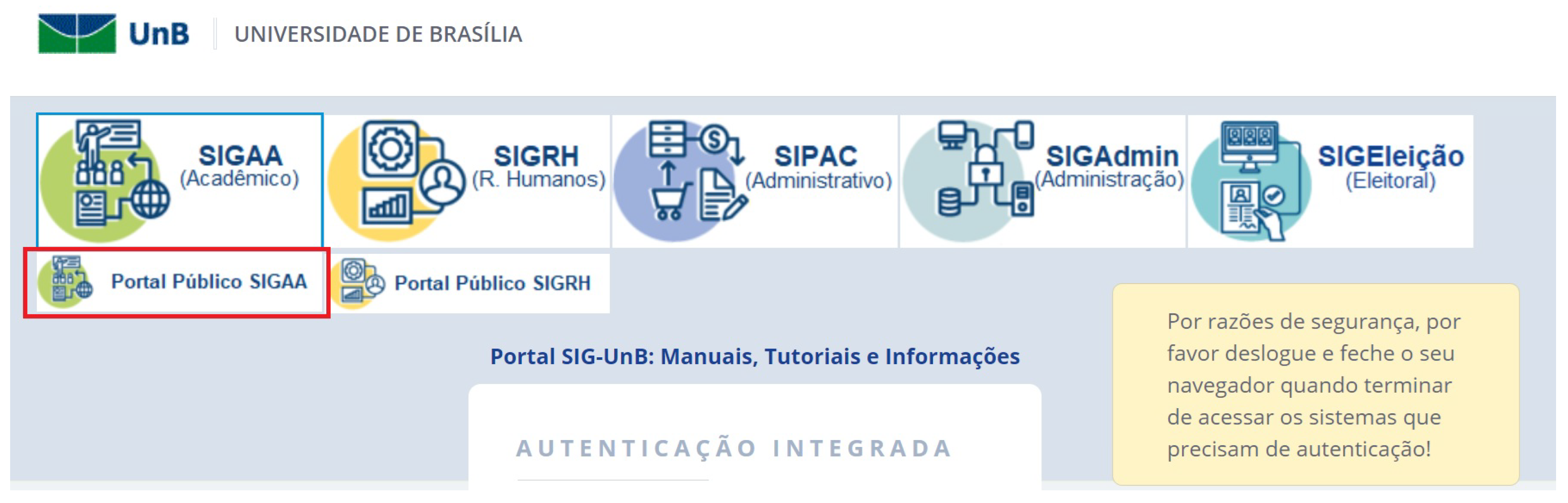
- Usability and accessibility test of the system with students who agreed to participate in the research and signed the IFC: to carry out the tests, the researcher informed the participants of the objectives and tasks to be carried out by the students at SIGAA. Students were asked to think aloud when carrying out the flows indicated by the researcher, which should be carried out without help from other people. Participants could choose to use the operating system’s accessibility mechanisms or their preferred screen reader. Therefore, they only interacted with the researchers by describing the screen and making their comments. Participants were invited to access the SIGAA public portal (Figure 1), which is located on the main page of the Integrated Management System (SIG).
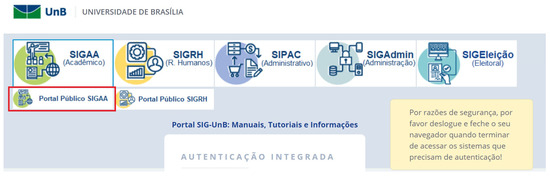 Figure 1. SIG main page. Source: institutional website of SIGAA.
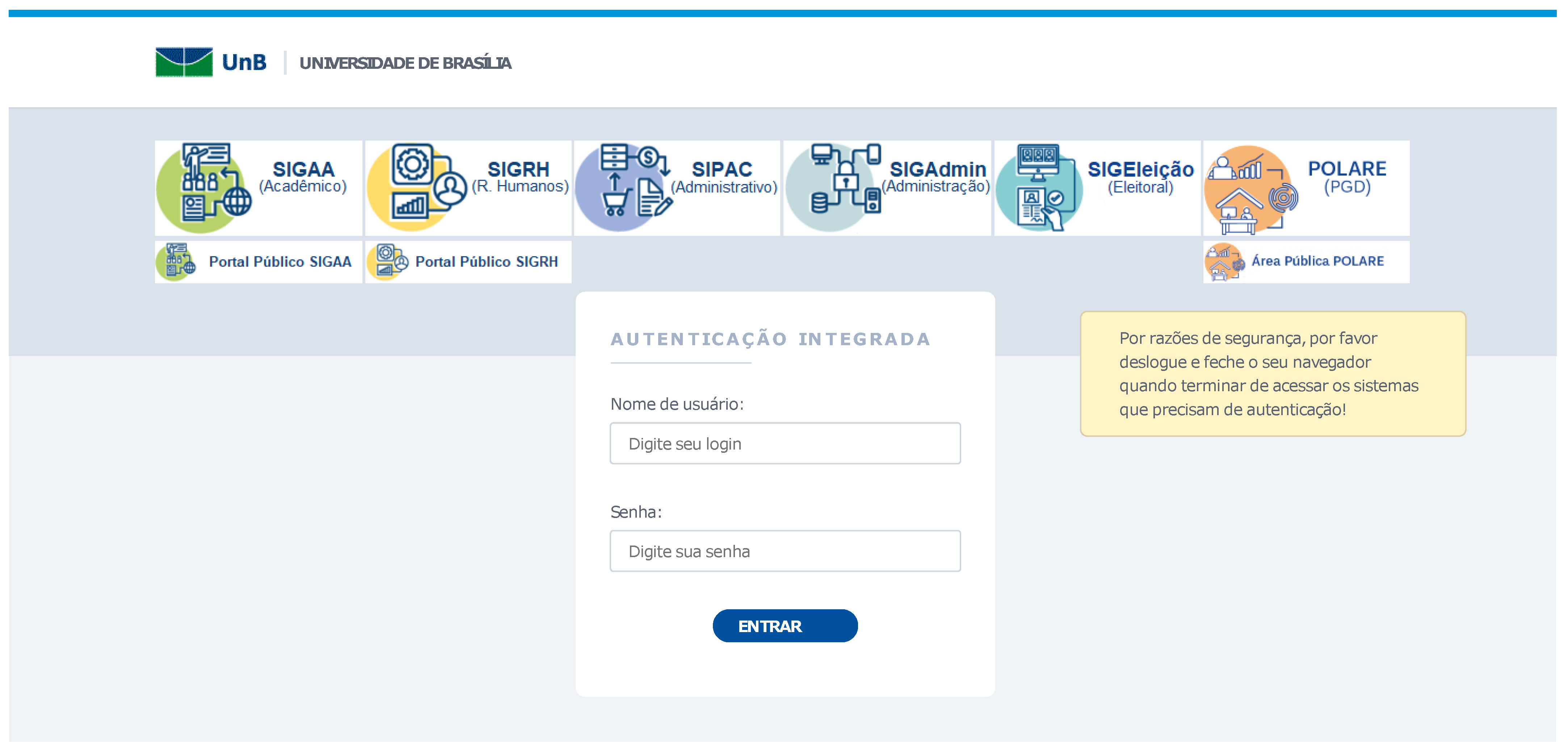
To do so, they were instructed to click on the link “Accessible for the visually impaired” link (Figure 2) and, thus, authenticate in the SIGAA module (Figure 3).

Figure 2.
SIGAA public portal. Source: institutional website of SIGAA.
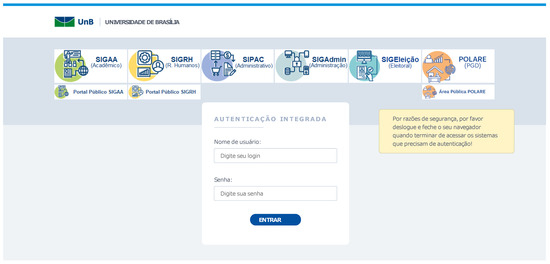
Figure 3.
Authentication page. Source: institutional website of SIGAA.
Participants were also asked to perform routine tasks in the academic environment, such as (a) self-registration, (b) issuing electronic documents, (c) course registration, and (d) access to the curriculum.
- Verification of W3C accessibility principles: during the execution of the requested tasks, the researchers checked the accessibility of the system’s graphs, tables, forms, and images through user reports. The researchers also collected data regarding the module’s accessibility and usability based on the success or failure in performing each task. According to W3C [8], a web system can be considered accessible when it is:
- –
- Perceivable: to have an interface that presents components and information clearly to the user.
- –
- Operable: to display content operable by both keyboard and mouse; be easy to navigate.
- –
- Understandable: have readable content that is easy to understand by the user to facilitate use and avoid errors.
- –
- Robust: present reliable content, with or without the aid of assistive technology.
The results in Table 2 present the tasks analyzed by the observers in relation to the principles (perceptible, operable, understandable, and robust) based on the participants’ feedback.
Table 2.
Tasks versus W3C principles. Source: prepared by the authors (2022).
- Verification of the user’s predictable emotional design at the end of each task: participants were asked about their emotional state at the end of each task. To this end, an adaptation of the non-verbal Self-Assessment Manikin (SAM) method [33] was made and used to catalog participants’ emotions. Users could choose one of the following emotional states: happy, sad, apathetic, frustrated, or angry. Through emotional design, one can better understand what makes something repulse or attract the attention of a certain system for a specific audience [34]. Considering users’ needs and emotions as they interact with the system contributes to the success or failure of solutions [35].
Table 3 presents the main issues encountered in the system by the users, as well as the emotions related to them. The primary emotions mentioned in response to the lack of accessibility were: frustration, sadness, and irritation.
Table 3.
Detected failures versus cataloged emotions. Source: prepared by the authors (2022).
- Cataloging the demographic profile of participants: the demographic profile of the participants was cataloged, and criticisms and suggestions for improving and adapting the system were collected.
3.2. Second Phase: Online Survey
This phase was carried out through an online survey of IT professionals who work with systems with a web interface. The steps taken are described below.
- Sample calculation: in this case, the universe or population is considered infinite, as it is impossible to estimate its size accurately [36]. Therefore, the sample is non-probabilistic and could not be calculated in advance, as well as the precision, standard error, and confidence level.
- Creation of a questionnaire to understand the profile of IT professionals who work with systems with a web interface: the survey was constructed using the Google Forms tool.
- Making the Survey available on social networks: the survey was made available through Facebook, WhatsApp, Instagram, and LinkedIn from 7 October 2021 to 15 October 2021. In this scenario, 73 questionnaires were answered by IT professionals.
- Analysis of participant responses: in addition to using the Google Forms tool to create graphs, the data obtained were crossed into an Excel spreadsheet for better analysis.
3.3. Third Phase: Documentary Analysis of the Curriculum Plan of 20 Brazilian Universities
A survey was carried out to obtain an overview of training courses for IT professionals in Brazil using the steps described below.
- Choice of twenty Brazilian public universities representing the five regions of the country (North, South, Southeast, Center-West, and Northeast): the 20 public universities from the five regions of the country were randomly chosen to analyze the syllabuses of training courses for IT professionals to understand the degree of importance of topics related to accessibility in the academic training of these professionals, as seen in Table 4.
Table 4. Presence of disciplines related to IHC. Source: Prepared by the authors (2022).
- Choice of training courses for IT professionals: Computer Science, Computer Engineering, and Software Engineering courses from the selected universities were chosen.
- Search for the curricula of selected courses on each university’s public page: a manual search was carried out in the syllabuses of the mandatory subjects of these courses using the following keywords: (software/system/interface) AND (acessi*) and/or (Human-Computer Interaction (HCI)) and/or (EMAG) and/or (WCAG). The results are presented in Table 4.
3.4. Online Survey with IT Professionals
The online survey was composed of four sections. The first section provided participants with the informed consent form (ICF), which included the content of the research and the inquiry regarding voluntary participation. If the participant agreed, they were directed to the second section.
The second section aimed to gather the demographic profile of the respondents. For this purpose, six mandatory questions were posed: (1) Do you have a disability? (2) Age group. (3) Educational level. (4) Main area of expertise. (5) Does the work you or your team does involve solutions with web interfaces? (6) How long have you been working in your current role?
The third section aimed to catalog the tools used by the participant or their team. This section consisted of 12 mandatory questions: (1) Do you use W3C/WCAGs in your work? (2) Do you believe that the applications developed by you or your team are accessible to people with disabilities? (3) Do you believe that the systems used by the company you work for are accessible to people with disabilities? (4) Do you or your team take accessibility (for people with disabilities) into account when working on systems used or developed? (5) Do you or your team implement accessibility techniques (for people with disabilities) during the project execution, or after the product/system is developed? (6) Do you or your team conduct accessibility analysis/testing with users with disabilities? (7) Do you or your team use any screen reader to perform accessibility analysis of your applications? (8) During development, what would motivate you or your team to use tools to ensure accessibility (for people with disabilities) in the systems developed? (9) Do you use Semantic HTML? (10) Which of these tools (for runtime accessibility analysis) do you use in your work to check the accessibility of your application? (11) Which web accessibility validation tools do you use in your work? (12) What could be done for you or your team to start using runtime accessibility analysis tools during system coding? And finally, the fourth section consisted of a thank you note for participating in the survey.
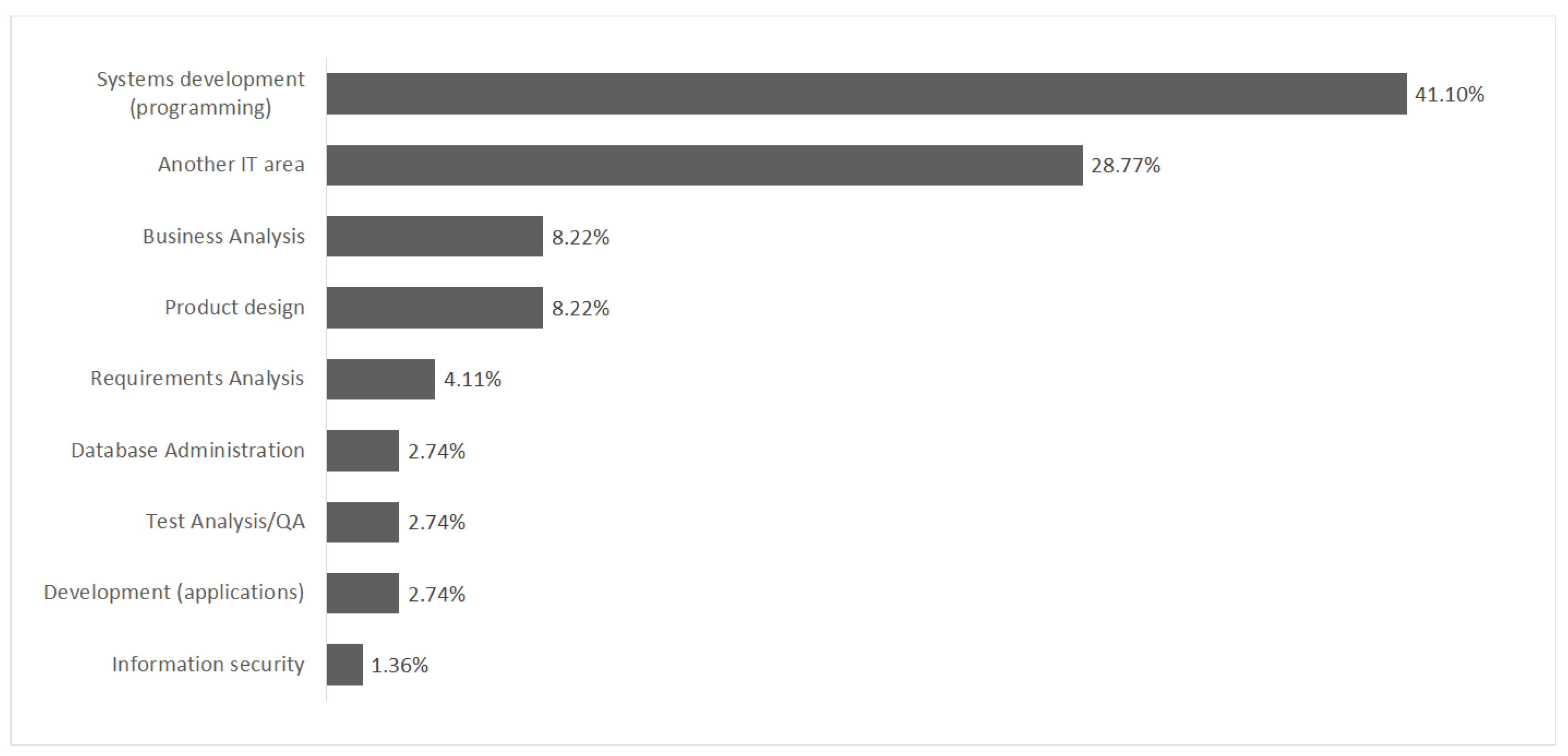
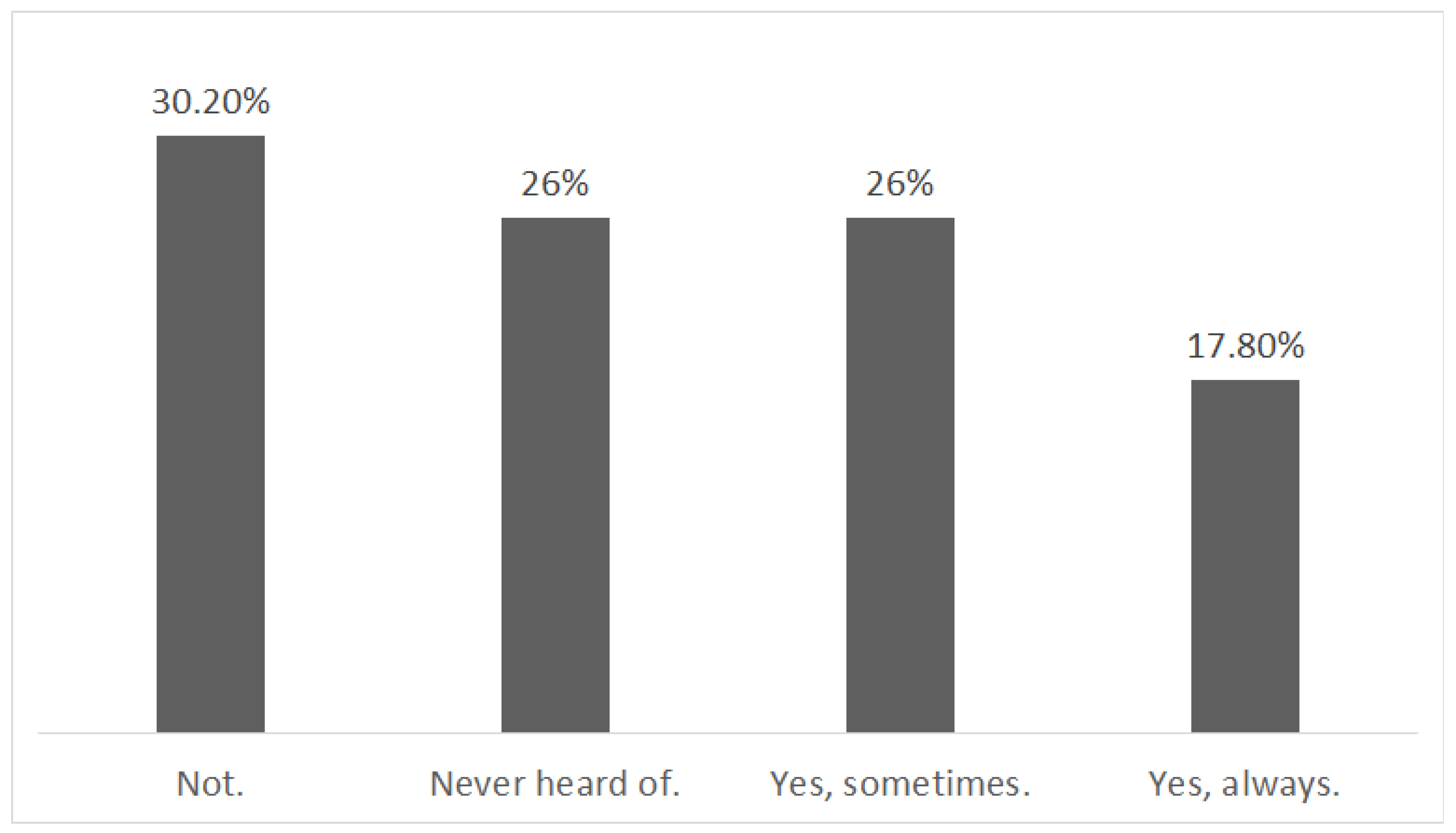
Data collected through the online survey show that more than 70% of the respondents were over 31 years old and had at least one university degree. The main areas of activity of the interviewees were the following: systems development (41.10%), product design (8.22%), business analysis (8.22%), (Figure 4), and more than 50% said they had more than five years of experience in their roles. Most of these professionals worked with solutions that have web interfaces. When asked about the W3C/WCAGs at work, 30.2% said they did not use them, 26% had never heard of them, 26% said they sometimes use them, and 17.8% stated that they always use them (Figure 5).
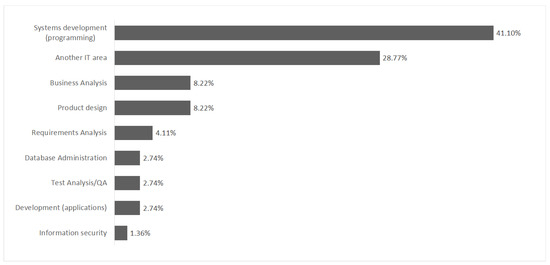
Figure 4.
Belief about the accessibility of developed systems. Source: prepared by the authors (2022).
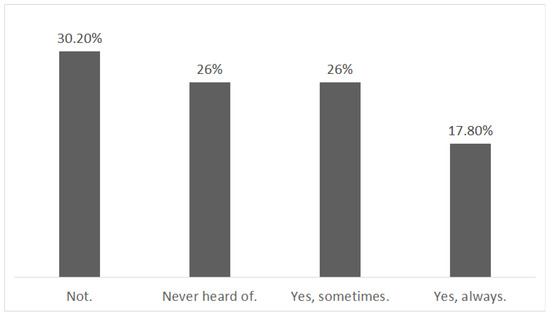
Figure 5.
Use of W3C/WCAGs. Source: prepared by the authors (2022).
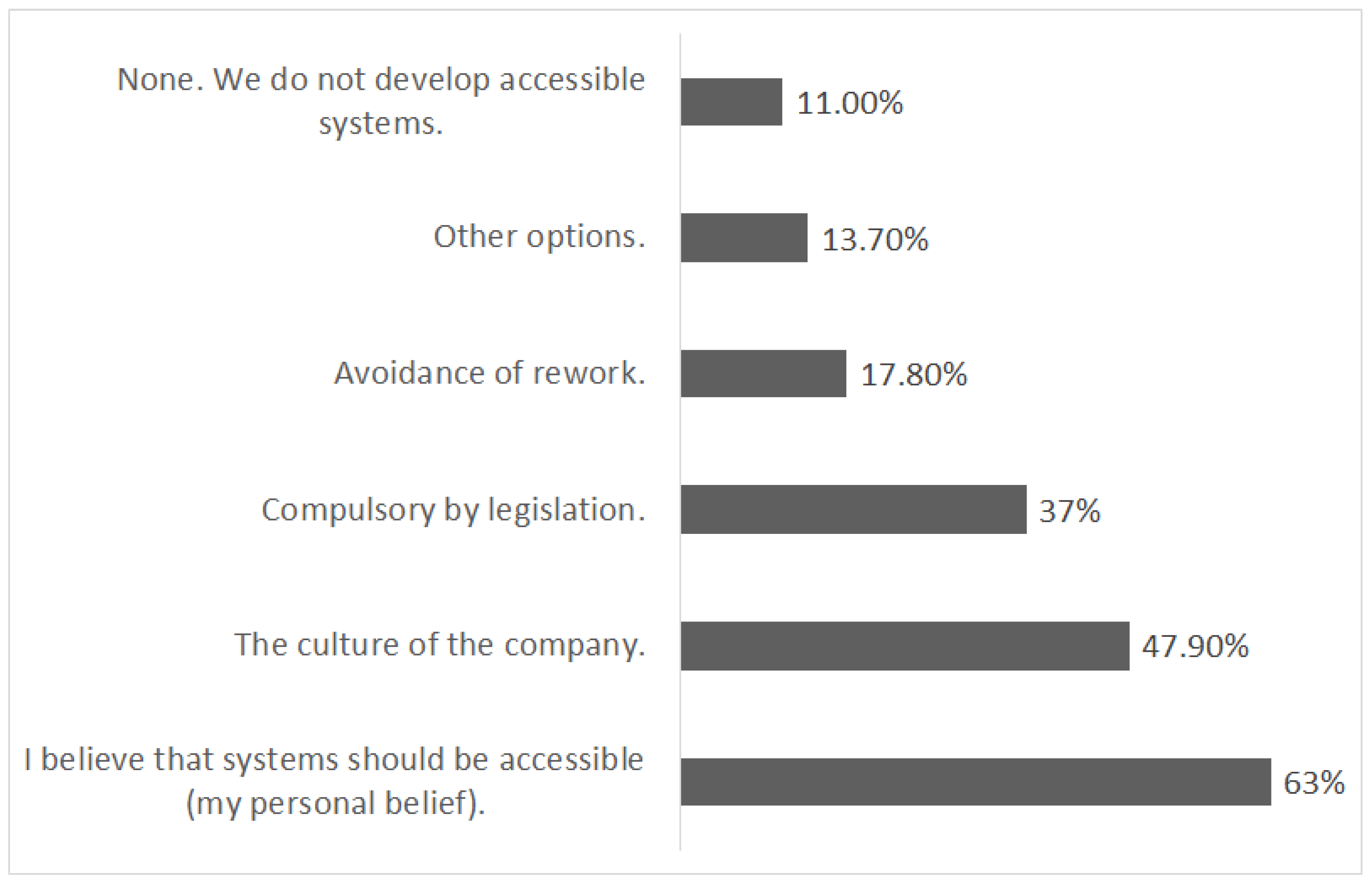
Regarding the motivations that would lead professionals or the team they work with to use tools to ensure the accessibility of systems, 63% of people said they believe that systems should be accessible, 47.9% believe that this motivation would come from the company culture, 37% believe that the motivation would come from mandatory legislation, and 17.8% thought it would avoid rework. Respondents could select one or more statements (Figure 6).
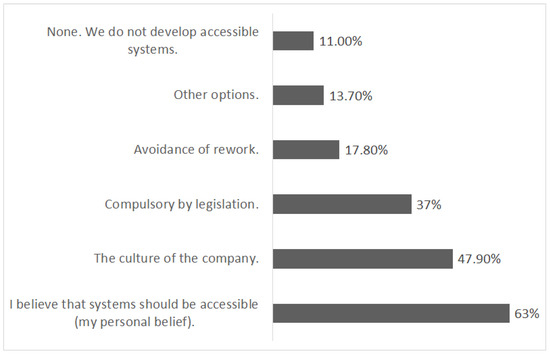
Figure 6.
Motivation for the use of tools that guarantee the accessibility of the systems. Source: prepared by the authors (2022).
In respect of the responses of the 43.9% who believed that the systems developed by them and/or their team are partially accessible, 15.1% considered that the accessibility of the systems reaches 70%, 13.7% believe in 50% accessibility in the systems, and 15.1% considered that only 20% of systems are accessible.
It is worth mentioning that 26% of respondents think accessible software is only dedicated to people with disabilities. Campos, Sánchez, and Souza (2013) [21] have already pointed out the existence of the myth that accessible websites are only helpful for a small portion of the population. Therefore, this paradigm continues to exist within organizations and among developers.
Regarding the belief that the systems used by the companies where the respondents worked are accessible, 47.9% believed that some systems were accessible, 26% stated that they were not accessible, 24.7% did not have this information, and 1.4% believed that all systems are accessible.
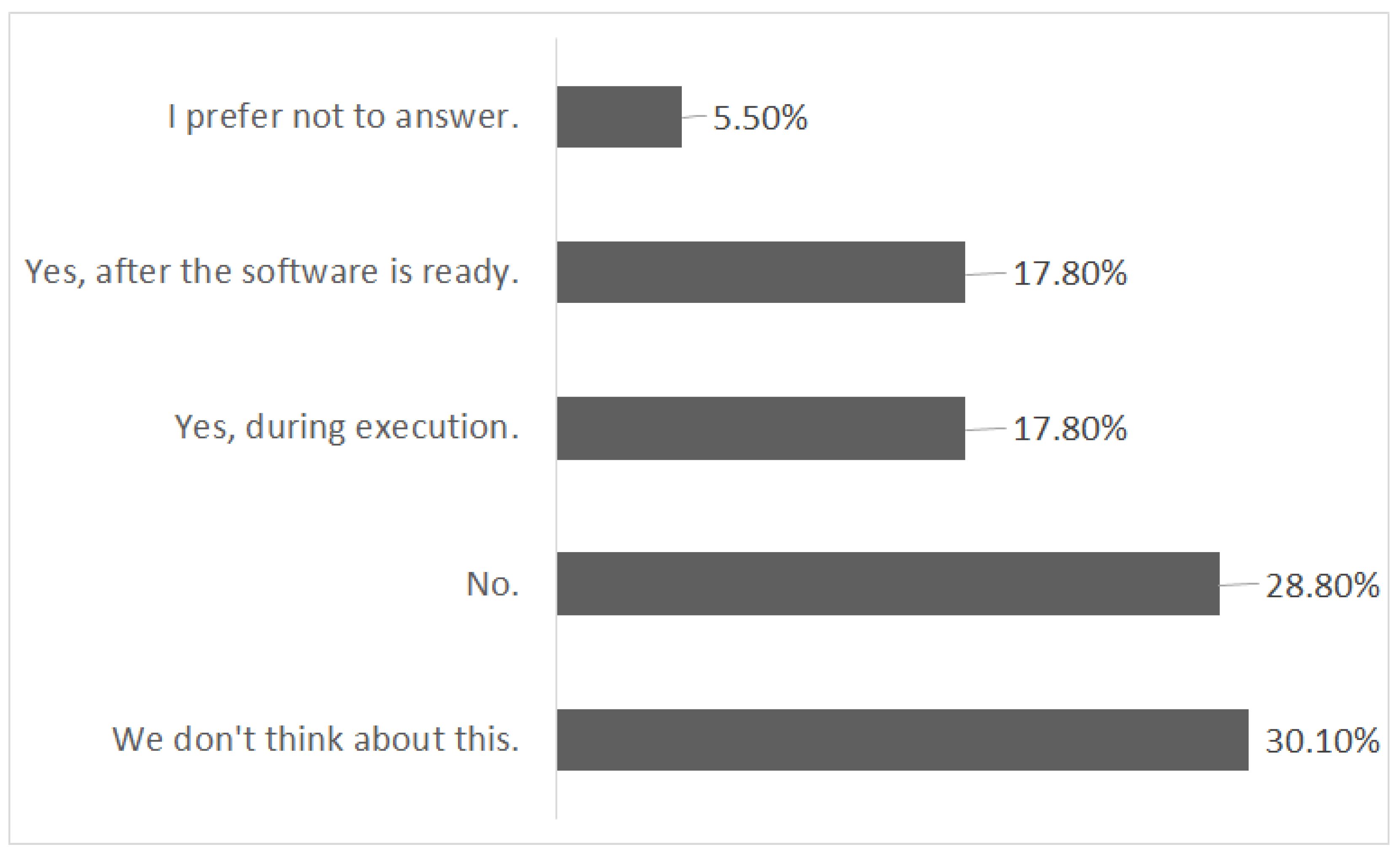
In respect of the use of accessibility techniques (during or after project execution), 17.8% stated that they use them during project execution. The same percentage (17.8%) said that they carry out tests and verify the need for improvements in system accessibility after the product is ready, and 28.8% stated that they do not use them. Furthermore, 30.1% said they did not think about it, and 5.5% preferred not to answer. The responses obtained indicate that the use of accessibility techniques is not a relevant aspect of software development. This behavior can generate rework, with additional costs and failures in accessibility implementations (Figure 7).
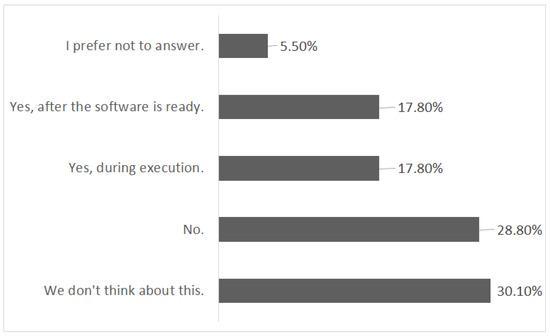
Figure 7.
Accessibility techniques during or after project execution. textbfSource: prepared by the authors (2022).
As for knowledge about tools that analyze code accessibility at runtime, 72.6% responded that they do not know such tools, 24.7% said they know, and 2.7% preferred not to respond. This lack of knowledge about tools that help code accessibility is a factor that prevents the development of accessible systems. It is evident from these responses that there is a need for continuous training of IT professionals with accessibility tools available on the market.
When asked about carrying out system analysis and/or testing by users with disabilities, 60.3% of respondents stated that they did not carry out any analysis/testing by users with disabilities, 19.2% said they do this sometimes, and 4.1% said they only do it when it is a system dedicated to people with disabilities. Additionally, 4.1% stated that they always carry out analysis/tests with people with disabilities, 2.7% preferred not to answer, and 9.6% answered that the question did not apply.
The data collected indicate that the experience of users with disabilities is not considered throughout the software development cycle. This conclusion is obtained because more than 60% of respondents stated that they did not conduct any analysis/testing with these users. Regarding the motivation that would lead the professional or the team they work with to use tools to ensure the accessibility of systems, 63% of people said they believe that systems should be accessible, 47% believe that this motivation would come from the company’s culture, 37% believe that the motivation would come from mandatory legislation, and 17.8% think it would avoid rework (Figure 6).
The answers to the online survey indicate that accessibility is not a strategic basis within organizations despite guidelines and legislation on this subject. This positioning is reflected in the work of IT professionals who often do not use or are unaware of accessibility tools. In addition, it was noticed that user participation during the software development cycle is still incipient, which would contribute to the accessibility of systems.
In this context, organizations play a relevant role in providing professionals with continuing education on accessibility and the importance of inclusion that it can provide. However, we believe this inclusive vision must start in academic training in compliance with legislation and accessibility policies.
The questionnaire results highlight a key area for improvement-the lack of awareness or use of software accessibility tools among professionals. Even 25 years after the first version of the WCAGs, developers are still not fully utilizing these guidelines. Furthermore, the user experience is often overlooked during the software development cycle.
It was noticed that even though the Brazilian federal government has initiatives in favor of access to information for blind people and specific legislation in favor of accessibility for websites and systems used within the government, such initiatives and legislation are not sufficient to ensure that software promotes the inclusion of available information and services.
3.5. Documentary Analysis of the Menus
At this stage of the research, syllabi of undergraduate courses related to the training of IT professionals were analyzed. Therefore, twenty public institutions in Brazil were selected (Table 4). The following terms were used in searches of mandatory course syllabi: (a) software/system accessibility and (b) HCI.
Regarding the term software/system accessibility, no university investigated had mandatory courses related to these terms. Regarding the term IHC, in the computer science course in all universities surveyed, the term appears in 35% of the compulsory subjects. In the Computer Engineering course offered in 80% of the universities surveyed, the same suit appears in 14% of the surveyed subjects. In the Software Engineering course, 20% of the universities surveyed, the term IHC appears in all mandatory subjects. It is worth mentioning that terms related to the W3C/WCAG guidelines were not found in any menu. Therefore, it can be concluded that the majority of the syllabus does not have subjects related to the terms investigated. The Table 4 presents the list of universities, courses, and disciplines related to HCI.
The absence of disciplines focused on systems accessibility can contribute to the culture of little development of accessible software within organizations, such as SIGAA, as analyzed in this research. The lack of knowledge on topics relating to accessibility can result in a gap in the training of IT professionals, which could be seen in the results obtained through online research. It is crucial to highlight the urgent and fundamental role of the university as a promoter in the dissemination of knowledge about the inclusion and accessibility of software.
This session addresses accessibility from three complementary dimensions: the experience of users with visual impairments, using academic software employed by 39 public educational institutions in Brazil; the technical knowledge of IT professionals; and the academic training of future software developers. The contributions are relevant but point to critical challenges and opportunities for advancement.
The application of the Living Lab at UnB revealed significant usability and accessibility flaws in SIGAA. Although the methodology was consistent, the sample size (seven participants) limits the generalizability of the results. Nevertheless, this study highlights the system’s failure to comply with WCAGs and reinforces the need for adaptations that promote greater inclusion of users with visual impairments.
The research with IT professionals revealed a critical knowledge gap on accessibility, with 72.67% unaware of specific tools and more than 60% not conducting tests with users with disabilities. These data emphasize the neglect of organizations in integrating accessibility as a key strategy in the software development cycle. Although the research addresses cultural and legal aspects as potential motivators, the contradiction between the belief in the importance of accessibility (63%) and its low practical application demonstrates the absence of effective organizational policies and continuous training.
The lack of mandatory accessibility-focused courses in the curricula of Brazilian universities reinforces the structural origin of the problem. Document analysis revealed that topics such as WCAGs, eMAG, and system accessibility are virtually absent from academic training, perpetuating a culture of misinformation in the market. This gap exposes the negligence of educational institutions in preparing professionals who are conscious of inclusion and accessibility.
4. Conclusions
This paper presents an innovative approach with an integrated methodology consisting of three phases: a living lab with users with visual impairments, an online survey with IT professionals, and an analysis of IT training curricula from 20 public universities. The results from the three phases point to the low utilization of accessibility guidelines and tools in software development. This scenario may stem from the inadequate training of IT professionals, both in academic environments and in continuous training within organizations.
Another aspect to highlight is the presence of beliefs that limit the adherence to accessibility guidelines. Among the beliefs found, the following stand out: the responsibility for software development based on legislation lies with the organization’s management group, accessible software should be dedicated exclusively to people with disabilities, the development of accessible software increases costs and development time, and accessible software impacts aspects related to the aesthetics of the website.
It was also noted that user experience is seldom utilized during the software development cycle. Furthermore, it was observed that there is little rigor in complying with legislation. It is important to emphasize that all these gaps contribute to the evasion and even low inclusion of students with visual impairments in the university environment.
It is worth mentioning that, even when all accessibility guidelines are followed, these recommendations would not be sufficient to make systems fully accessible, as they only cover 53% of the accessibility experienced [12,13]. Therefore, changes in current legislation should include aspects related to the use of Universal Design (UD) and the user experience. However, it is not enough to simply modify the legislation; it is necessary to develop educational measures and actions to raise awareness within organizations, as well as strict procedures for the effective enforcement of the laws. Thus, the legislation could encompass other sectors of society beyond the public sphere.
This paper does not intend to exhaust the subject, but rather to contribute to research related to these issues. It also aims to help develop a mindset of integration among different sectors of society so that accessibility is effectively implemented during the software development cycle. It is understood that the university, as a living lab, can play a key role in creating a microcosm of accessibility that permeates not only physical issues but also those related to computational systems. Therefore, accessibility should not be viewed as an isolated concern, but as an integrated element that encompasses different sectors of society. It should be considered a strategic pillar within organizations, not an autonomous issue.
Author Contributions
Conceptualization, M.C. and C.H.L.; methodology, M.C., C.H.L.; investigation, M.C.; data curation, M.C. and C.H.L.; writing—original draft preparation, M.C., C.H.L. and M.A.V.; writing—review and editing, M.C. and M.A.V.; visualization, M.C. and Vitoriano; supervision, C.H.L.; project administration, M.C. All authors have read and agreed to the published version of the manuscript.
Funding
This research received no external funding.
Institutional Review Board Statement
Consent from the ethics committee for participation in the living lab was obtained by the Accessibility Department of the University of Brasília, which has internal rules for research with students. For the online questionnaire, this was waived due to the fact that it is a survey without access to sensitive user data.
Informed Consent Statement
Informed consent was obtained from all subjects involved in the study by the Accessibility Department of the University of Brasília via email, which was essential for student participation. For the online survey, consent was described before the survey was conducted, and this was essential for student participation.
Data Availability Statement
The original contributions presented in this study are included in the article. Further inquiries can be directed to the corresponding author.
Conflicts of Interest
The authors declare no conflicts of interest.
References
- Sharit, J.; Moxley, J.H.; Boot, W.R.; Charness, N.; Rogers, W.A.; Czaja, S.J. Effects of Extended Use of an Age-friendly Computer System on Assessments of Computer Proficiency, Attitudes, and Usability by Older Non–Computer Users. ACM Trans. Access. Comput. 2019, 12, 1–28. [Google Scholar] [CrossRef]
- ISO/IEC 25010; Systems and Software Engineering—Systems and Software Quality Requirements and Evaluation (SQuaRE)—System and Software Quality Models. ISO: Geneva, Switzerland, 2011.
- Björk, E. Many become losers when the Universal Design perspective is neglected: Exploring the true cost of ignoring Universal Design principles. Technol. Disabil. 2009, 21, 117–125. [Google Scholar] [CrossRef]
- Valentim, N.M.C.; Rabelo, J.; Silva, W.; Coutinho, W.; Mota, Á.; Conte, T. Avaliando a Qualidade de um Aplicativo Web Móvel Através de um Teste de Usabilidade: Um Relato de Experiência. In Proceedings of the Anais do XIII Simpósio Brasileiro de Qualidade de Software, SBC, Blumenau, Brazil, 4–8 August 2014; pp. 256–263. [Google Scholar]
- Beingolea, J.R.; Zea-Vargas, M.A.; Huallpa, R.; Vilca, X.; Bolivar, R.; Rendulich, J. Assistive Devices: Technology Development for the Visually Impaired. Designs 2021, 5, 75. [Google Scholar] [CrossRef]
- IBGE. Instituto Brasileiro de Geografia e Estatística. 2019. Available online: https://www.ibge.gov.br/ (accessed on 31 September 2023).
- INEP. Instituto Nacional de Estudos e Pesquisas Educacionais Anísio Teixeira|Inep. 2023. Available online: https://www.gov.br/inep/pt-br (accessed on 31 October 2023).
- W3C. Web Content Accessibility Guidelines (WCAG) 2.1 W3C. 2018. Available online: http://www.w3.org/WAI/intro/wcag20 (accessed on 1 July 2025).
- ISO 9241-210; Ergonomics of Human-System Interaction—Part 210: Human-Centred Design for Interactive Systems. ISO: Geneva, Switzerland, 2019. Available online: https://www.iso.org/standard/77520.html (accessed on 1 November 2024).
- Crilly, N. Do users know what designers are up to? Product experience and the inference of persuasive intentions. Int. J. Des. 2011, 5. Available online: https://ijdesign.org/index.php/IJDesign/article/view/716 (accessed on 5 June 2025).
- Manca, M.; Palumbo, V.; Paternò, F.; Santoro, C. The Transparency of Automatic Web Accessibility Evaluation Tools: Design Criteria, State of the Art, and User Perception. ACM Trans. Access. Comput. 2023, 16, 1–36. [Google Scholar] [CrossRef]
- Power, C.; Freire, A.; Petrie, H.; Swallow, D. Guidelines Are Only Half of the Story: Accessibility Problems Encountered by Blind Users on the Web. In Proceedings of the SIGCHI Conference on Human Factors in Computing Systems, Seattle, WA, USA, 11–15 February 2012; pp. 433–442. [Google Scholar]
- Yesilada, Y.; Brajnik, G.; Vigo, M.; Harper, S. Exploring perceptions of web accessibility: A survey approach. Behav. Inf. Technol. 2015, 34, 119–134. [Google Scholar] [CrossRef]
- Brajnik, G.; Yesilada, Y.; Harper, S. Is accessibility conformance an elusive property? A study of validity and reliability of WCAG 2.0. ACM Trans. Access. Comput. (TACCESS) 2012, 4, 1–28. [Google Scholar] [CrossRef]
- Lacasa, P.; Martínez, R.; Méndez, L.; Cortés, S. Classrooms as “Living Labs”: The Role of Commercial Games. In Proceedings of the 5th Media in Transition Conference, Cambridge, MA, USA, 27–29 April 2007; MIT: Cambridge, MA, USA. Available online: https://shre.ink/xj3N (accessed on 5 June 2025).
- Almirall, E.; Lee, M.; Wareham, J. Mapping living labs in the landscape of innovation methodologies. Technol. Innov. Manag. Rev. 2012, 2. Available online: https://www.timreview.ca/article/603 (accessed on 5 June 2025). [CrossRef]
- Dell’Era, C.; Landoni, P. Living Lab: A methodology between user-centred design and participatory design. Creat. Innov. Manag. 2014, 23, 137–154. [Google Scholar] [CrossRef]
- Madugalla, A.; Marriott, K.; Marinai, S.; Capobianco, S.; Goncu, C. Creating Accessible Online Floor Plans for Visually Impaired Readers. ACM Trans. Access. Comput. 2020, 13, 1–37. [Google Scholar] [CrossRef]
- Carletto, A.C.; Cambiaghi, S. Desenho Universal: Um Conceito Para Todos; Instituto Mara Gabrilli: São Paulo, Brazil, 2008. [Google Scholar]
- Aizpurua, A.; Harper, S.; Vigo, M. Exploring the relationship between web accessibility and user experience. Int. J. Hum. Comput. Stud. 2016, 91, 13–23. [Google Scholar] [CrossRef]
- Campos, M.d.B.; Sánchez, J.; de Souza, T.C. Acessibilidade na Web no Brasil: Percepções dos usuários com deficiência visual e desenvolvedores Web. Proc. Nuevas Ideas Inform. Educ. TISE. 2013, pp. 325–333. Available online: https://www.tise.cl/volumen9/TISE2013/325-333.pdf (accessed on 10 June 2025).
- Campoverde-Molina, M.; Luján-Mora, S.; Valverde, L. Accessibility of university websites worldwide: A systematic literature. Univers. Access Inf. Soc. 2023, 22, 133–168. [Google Scholar] [CrossRef]
- ISO/IEC 40500; Information Technology—W3C Web Content Accessibility Guidelines (WCAG) 2.0. ISO: Geneva, Switzerland, 2012. Available online: https://www.iso.org/standard/58625.html (accessed on 1 November 2024).
- Cao, S.; Loiacono, E. Perceptions of web accessibility guidelines by student website and app developers. Behav. Inf. Technol. 2022, 41, 2616–2634. [Google Scholar] [CrossRef]
- da Silva, B.G.; Rodrigues, K.R.H. Accessibility Challenges in Web Systems Implementation. In Proceedings of the Anais do IX Workshop Sobre Aspectos da Interação Humano-Computador para a Web Social, SBC; 2018; pp. 105–116. Available online: https://sol.sbc.org.br/index.php/waihcws/article/view/3900 (accessed on 10 June 2025).
- Farrelly, G. Practitioner barriers to diffusion and implementation of web accessibility. Technol. Disabil. 2011, 23, 223–232. [Google Scholar] [CrossRef]
- Lazar, J.; Allen, A.; Kleinman, J.; Malarkey, C. What frustrates screen reader users on the web: A study of 100 blind users. Int. J. Hum.-Comput. Interact. 2007, 22, 247–269. [Google Scholar] [CrossRef]
- Lewthwaite, S. Web accessibility standards and disability: Developing critical perspectives on accessibility. Disabil. Rehabil. 2014, 36, 1375–1383. [Google Scholar] [CrossRef]
- Lopes, R.; Gomes, D.; Carriço, L. Web Not for All: A Large Scale Study of Web Accessibility. In Proceedings of the 2010 International Cross Disciplinary Conference on Web Accessibility (W4A), Raleigh, NC, USA, 26–27 April 2010; pp. 1–4. [Google Scholar]
- Vigo, M.; Harper, S. Evaluating Accessibility-In-Use. In Proceedings of the 10th International Cross-Disciplinary Conference on Web Accessibility, Rio de Janeiro, Brazil, 13–15 May 2013; pp. 1–4. [Google Scholar]
- Youngblood, S.A. Communicating web accessibility to the novice developer: From user experience to application. J. Bus. Tech. Commun. 2013, 27, 209–232. [Google Scholar] [CrossRef]
- Cochran, W.G. Sampling Techniques, 3rd ed.; John Wiley & Sons: New York, NY, USA, 1963. [Google Scholar]
- Lang, P. Behavioral Treatment and Bio-Behavioral Assessment: Computer Applications. In Technology in Mental Health Care Delivery Systems; Ablex: Norwood, NJ, USA, 1980; pp. 119–137. [Google Scholar]
- Fokkinga, S.F.; Desmet, P.M. Ten ways to design for disgust, sadness, and other enjoyments: A design approach to enrich product experiences with negative emotions. Int. J. Des. 2013, 7. Available online: https://www.ijdesign.org/index.php/IJDesign/article/view/1180 (accessed on 10 June 2025).
- Väänänen-Vainio-Mattila, K.; Roto, V.; Hassenzahl, M. Towards Practical User Experience Evaluation Methods. Meaningful Measures: Valid Useful User Experience Measurement (VUUM). 2008, pp. 19–22. Available online: https://www.researchgate.net/publication/239749277_Towards_Practical_User_Experience_Evaluation_Methods (accessed on 10 June 2025).
- Cunha, M.B.d.; Amaral, S.d.; Dantas, E.B. Manual de Estudo de Usuários da Informação; Atlas: São Paulo, Brazil, 2015; Available online: https://revistas.um.es/analesdoc/article/view/245701 (accessed on 10 June 2025).

Disclaimer/Publisher’s Note: The statements, opinions and data contained in all publications are solely those of the individual author(s) and contributor(s) and not of MDPI and/or the editor(s). MDPI and/or the editor(s) disclaim responsibility for any injury to people or property resulting from any ideas, methods, instructions or products referred to in the content. |
© 2025 by the authors. Licensee MDPI, Basel, Switzerland. This article is an open access article distributed under the terms and conditions of the Creative Commons Attribution (CC BY) license (https://creativecommons.org/licenses/by/4.0/).