
You are currently viewing a new version of our website. To view the old version click .
Technologies
  • Article
  • Open Access

20 December 2018

RabbitRun: An Immersive Virtual Reality Game for Promoting Physical Activities Among People with Low Back Pain †

,
and
1
Information System Department, College of Computer and Information Sciences, King Saud University, Riyadh 11495, Saudi Arabia
2
Information Technology Department, College of Computer and Information Sciences, King Saud University, Riyadh 11495, Saudi Arabia
3
Department of Rehabilitation Sciences, College of Applied Medical Sciences, King Saud University, Riyadh 11495, Saudi Arabia
*
Author to whom correspondence should be addressed.
This article belongs to the Special Issue The PErvasive Technologies Related to Assistive Environments (PETRA)

Abstract

Low back pain (LBP) is one of the most common problems among adults. The usual physiotherapy treatment is to perform physical exercises. However, some LBP patients have false beliefs regarding their pain and they tend to avoid physical movements which might increase their pain and disability. Virtual reality (VR) has proven to be an effective intervention in improving motor functions and reducing pain perception. Existing VR interventions for LBP rehabilitation were based on a non-immersive VR, whereas to effectively reduce the pain intensity, we need an immersive VR. In this paper, we introduce the development and evaluation of a serious game called RabbitRun with an immersive experience to engage the patients in a virtual environment and distract them from the pain while performing LBP exercises. The initial usability evaluation results suggest that RabbitRun game is enjoyable and acceptable. The game is easy to play and learn and most of the participants are willing to play the game at home. This solution will enhance the rehabilitation outcome since the patients who are suffering from LBP can use the system at their home and train more for long period of time using a smartphone and low-cost virtual reality device, such as Google Cardboard.

1. Introduction

Globally, low back pain (LBP) is considered number one reason for disability among adults [1]. About eighty percent of the population has experienced low back pain once in their life [2]. LBP has social and economic impacts whereas it is one of the most common causes of work absence and activity limitation [3]. Based on a Clinical Practice Guideline on LBP, physical exercises are one of the most effective rehabilitation methods [4,5].
LBP is usually described by duration as acute, sub-acute or chronic. Acute LBP lasts less than 6 weeks, whereas sub-acute LBP lasts for more than 3 months. If the pain lasts from 6 to 12 weeks, then the pain is classified as Chronic Low Back Pain (CLBP) [6,7]. Between 5% and 10% of the cases will develop to CLBP [8], due to some psychosocial factors such as believing that physical activities are harmful, having long time bed rest and depression [6]. Also, LBP can be described by the cause as non-specific low back pain (NSLBP) and specific LBP. NSLBP is defined as “low back pain not attributed to recognizable, known specific pathology (e.g., infection, tumor, osteoporosis, ankylosing spondylitis, fracture, inflammatory process, radicular syndrome or cauda equina syndrome)” [9]. About 5–15% of low back pain cases are classified as a result of a specific cause such as vertebral infections, tumors and bone metastasis, whereas, the majority of low back pain cases, 85–95%, are non-specific [9].
Fear-Avoidance model is a model that explains the development of low back pain from acute, sub-acute to chronic pain [10]. According to the model, the development of musculoskeletal pain, including low back pain, in individuals will differ based on their levels of pain-related fear (also known as kinesiophobia). Those who are prone to catastrophize the pain are more likely to precept the pain as a sign of serious back harm or damage. Therefore, they tend to avoid movements and physical activities due to their false believe that it will exaggerate the damage or prompt reinjury. Consequently, resulting in greater functional disability. In contrast, individuals with low pain-related fear are more likely to perform their daily activities normally and make progress in their rehabilitation program. Therefore, the potential of chronic development will be decreased, and they tend to recover from low back pain more than individuals with kinesiophobia.
To break the fear cycle, virtual reality (VR) can be used as a pain distraction [11]. Distracting the patients within an immersive virtual world would allow them to perform the prescribed physical activities unconsciously. This will result in overall pain decrease and functional improvements.
Virtual reality has shown to be an effective intervention in improving motor functions and reducing the pain perception [12]. Existing VR interventions for LBP rehabilitation were based on a non-immersive VR, whereas to effectively reduce the pain intensity, we need an immersive VR. Immersive VR has been utilized in reducing acute pain during medical procedures such as burn care.
The main goal of this project is to develop a serious game that targets LBP patients who have kinesiophobia (fear of movement due to the feel of pain), the game is called RabbitRun. Based on the Fear-Avoidance model, the fear comes from the pain perception. Thus, to break the fear cycle, we need first to reduce the pain intensity by using immersive VR. We have integrated both physical activities and immersive VR to keep the patients engaged in the virtual environment, distracting them from pain while performing LBP exercises. The game provides a set of exercises that can be customized based on individual’s need. We have implemented a portable mobile rehabilitation game using an affordable VR device such as Cardboard.
The rest of the paper is organized as follows: Section 2 reviews the existing VR games for LBP and pain management, Section 3 describes the game development and evaluation processes, in Section 4 we present the evaluation results and the last section presents the principal findings, limitations and future work.

3. Methods

3.1. Development Process

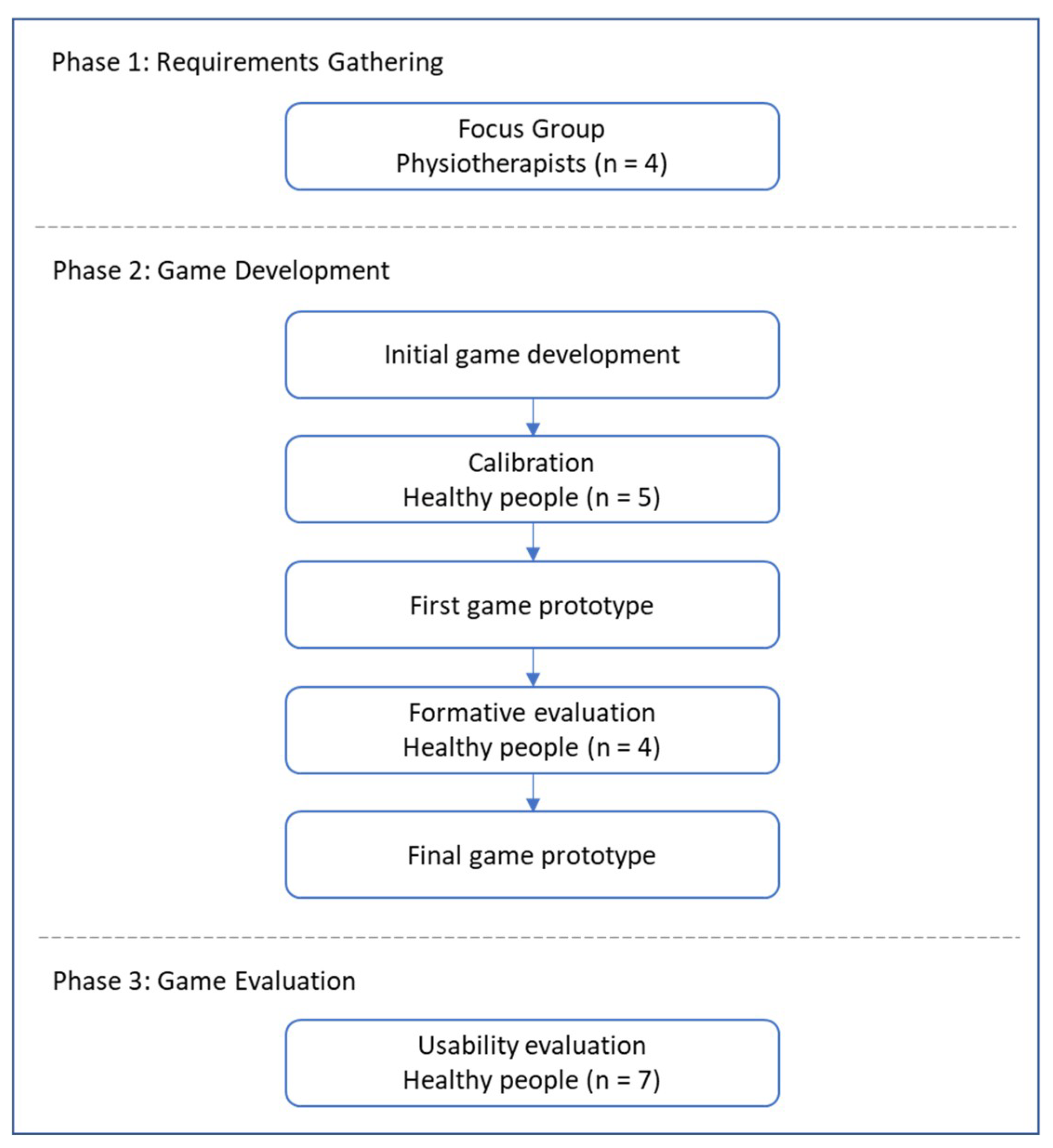
The development of the game has gone through three phases, as seen in (Figure 1). The first phase to design RabbitRun game is to gather requirements from previous research as well as conduct a focus group with four physiotherapists. The second phase is the design and development of the game. During this phase, a formative evaluation has been conducted and four healthy people were recruited with the aim of improving the game’s design and performance. Finally, in phase 3, we recruited seven healthy people to evaluate the usability of the final prototype of the game.
Figure 1. The development process of the game.

3.2. Requirements Gathering

We applied Focus Group technique to gather the game requirements from physiotherapists. We conducted a focus group with four physiotherapists who are specialized in musculoskeletal physiotherapy. The physiotherapists have more than two years of experience in treating LBP patients with various therapy intervention including exercises. The interview lasts for one hour. We discussed the general characteristics of LBP patients, the usual physiotherapy treatment and their opinion in introducing VR and serious games technologies in the rehabilitation program.
All of the physiotherapists agreed on common problems associated with LBP such as work absence, functional and structural disabilities, and psychological disorders like depression. They also stated some obstacles in the management of patients with LBP. Patients tend not to adhere to the home exercises and some of them have significant fear of movements.
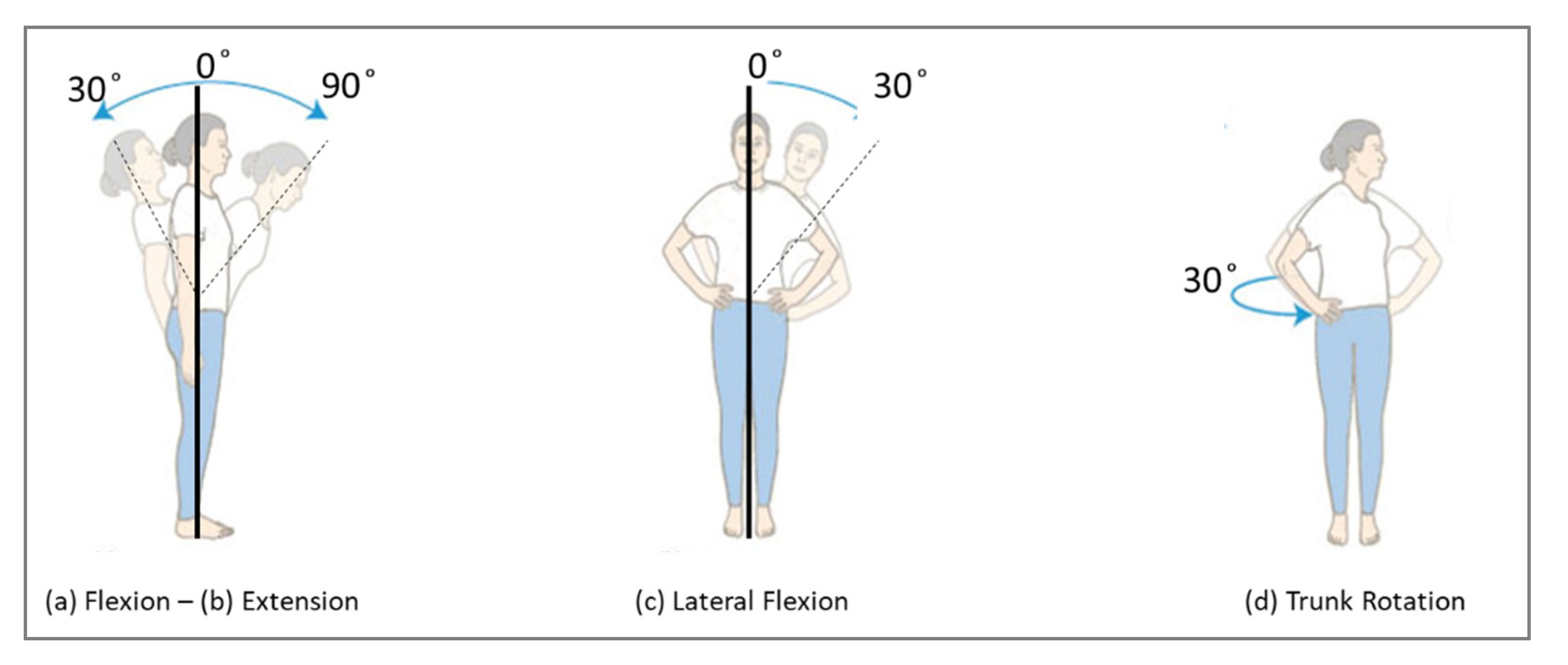
The physiotherapy treatment of LBP differs based on the cause of the pain. The usual treatment for Non-Specific LBP is the physical exercises. The exercises treatment process has mainly two stages: first they start with flexibility exercises and then strength exercises. Other causes such as infections are treated using manual therapy or surgical intervention. Among a long list of flexibility exercises, four common exercises were considered in this development: trunk flexion (forward bending), trunk extension (backward bending), lateral tilt (left- and right-side trunk bending) and trunk rotation.
They stated that using the technology would be very helpful if it has some of the following criteria: select a set of exercises among different exercises, adjustment of the number of repetitions, exercise frequency per day and report the patient commitments. Additionally, they have suggested an adjustment of the hold time, reminders, and exercise correction; however, these three criteria have not been included in the current development because the main goal of our project is motivating the patients rather than correcting their performance.

3.3. Game Design and Development

3.3.1. Equipment and Development Tools

To promote the use of the game at home, the equipment should be relatively inexpensive, easy to acquire and portable. Therefore, the game can be run on a mobile phone with Android 4.1 or higher or iOS version 8.0 or higher to run the required VR libraries. Also, a VR headset such as Google Cardboards is needed to play the game.
We developed the game using Unity game engine [23] for the creation of the virtual environment along with Microsoft Visual Studio to write the interactive scripts in C# programming language [24]. To add the virtual reality support in Unity, we used Google VR software development kit which generates VR environments that run optimally on mobile devices with Google Cardboards [25]. This package contains the necessary libraries for convert a single camera application in a dual camera.

3.3.2. Game Features

The RabbitRun game can be used by LBP patients with the help of the physiotherapist. The target age group is between 16 and 30 years old. We target the patients who have LBP without specific causes and with pain lasting for more than 12 weeks i.e. Non-Specific Chronic LBP (NSCLBP). The LBP Exercise game will be an ideal game for LBP patients who have kinesiophobia (fear of movement due to pain). In this subsection, we will present the features and functions of the RabbitRun game.
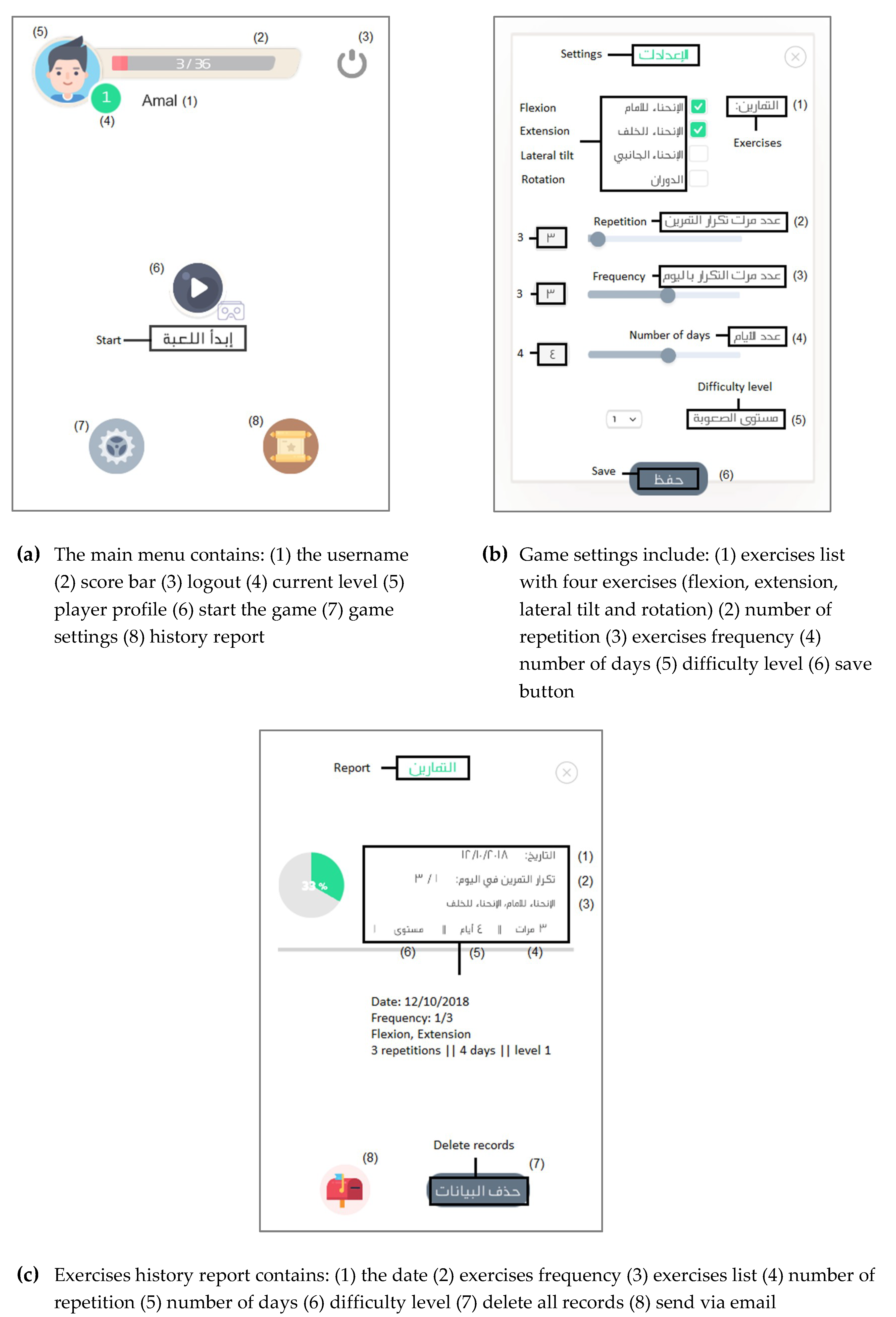
Register/login: the game allows the user to create a new profile with his personal information (username, email, password). The user must provide the email and the password to login. After logging in, the main menu will appear to the user, as seen in (Figure 2a). In the main menu, the user can view/edit his profile information, edit the game setting, view history report, send it via email and start playing the game.
Figure 2. Screenshots of RabbitRun game: (a) the main menu, (b) game settings, (c) exercises history report.
Game settings: the game setting can be changed based on the individual needs. The user can select all or some of the exercise list (flexion, extension, lateral tilt, rotation). The user can define the number of repetitions for the exercise set. Also, the user shall specify the exercise frequency per day, the number of days for performing the exercise as well as the difficulty level of the game. A screenshot of the game setting is shown in (Figure 2b).
Exercise history report: the exercise history for each user is recorded and saved, as seen in (Figure 2c). The history report includes the date, the exercise set, number of repetitions, number of the required days, the difficulty level and the number of times in which the player has played the game with the current settings (frequency). This report shows the patient’s progress and adherence to home exercises. The user can send the exercise history report to his/her registered email.
Calibration: before the game starts, the calibration screen will appear to the user to calibrate the player location with the game. The player is asked to stay still for five seconds to save his current dimensions, which will help in tracking the player movement during the gameplay.
How to play: after the calibration, an instruction screen will be shown to the player including which exercises will be performed in the game and how to perform each exercise. The player can warm up by performing the exercises before start playing the game. In addition, the user may skip this screen at any time.

3.3.3. Gameplay Description

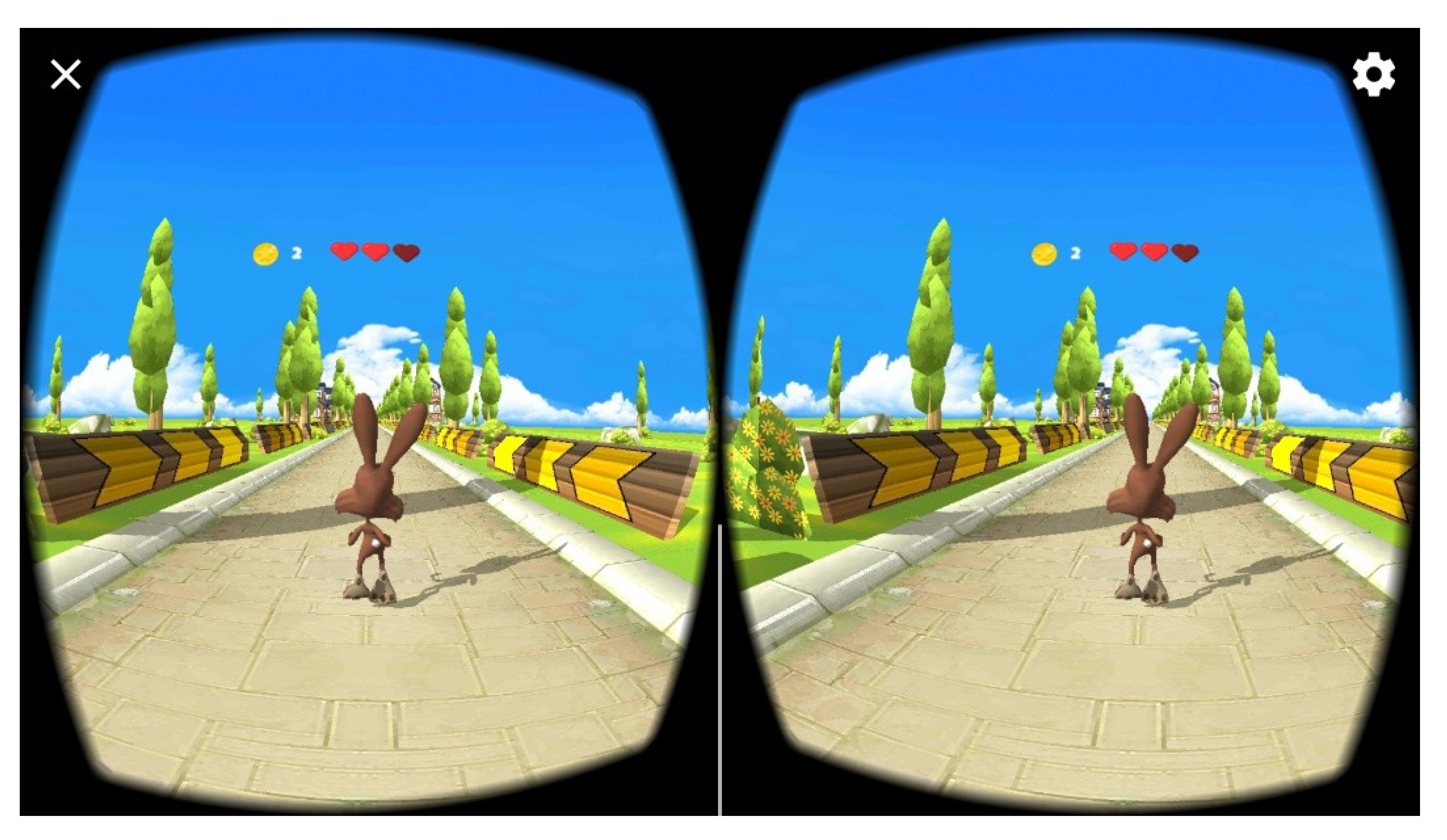
RabbitRun Game scenario takes place in a village where the player controls a rabbit that is walking on the village road. The Rabbit tries to avoid obstacles and collect coins. The game has an element of surprise by dynamically showing obstacles and coins, which gives a sense of excitement to the players. The interaction model is avatar-based, and the camera model is 3D third person perspective. The game world layout is shown in (Figure 3).
Figure 3. Gameplay of RabbitRun game.
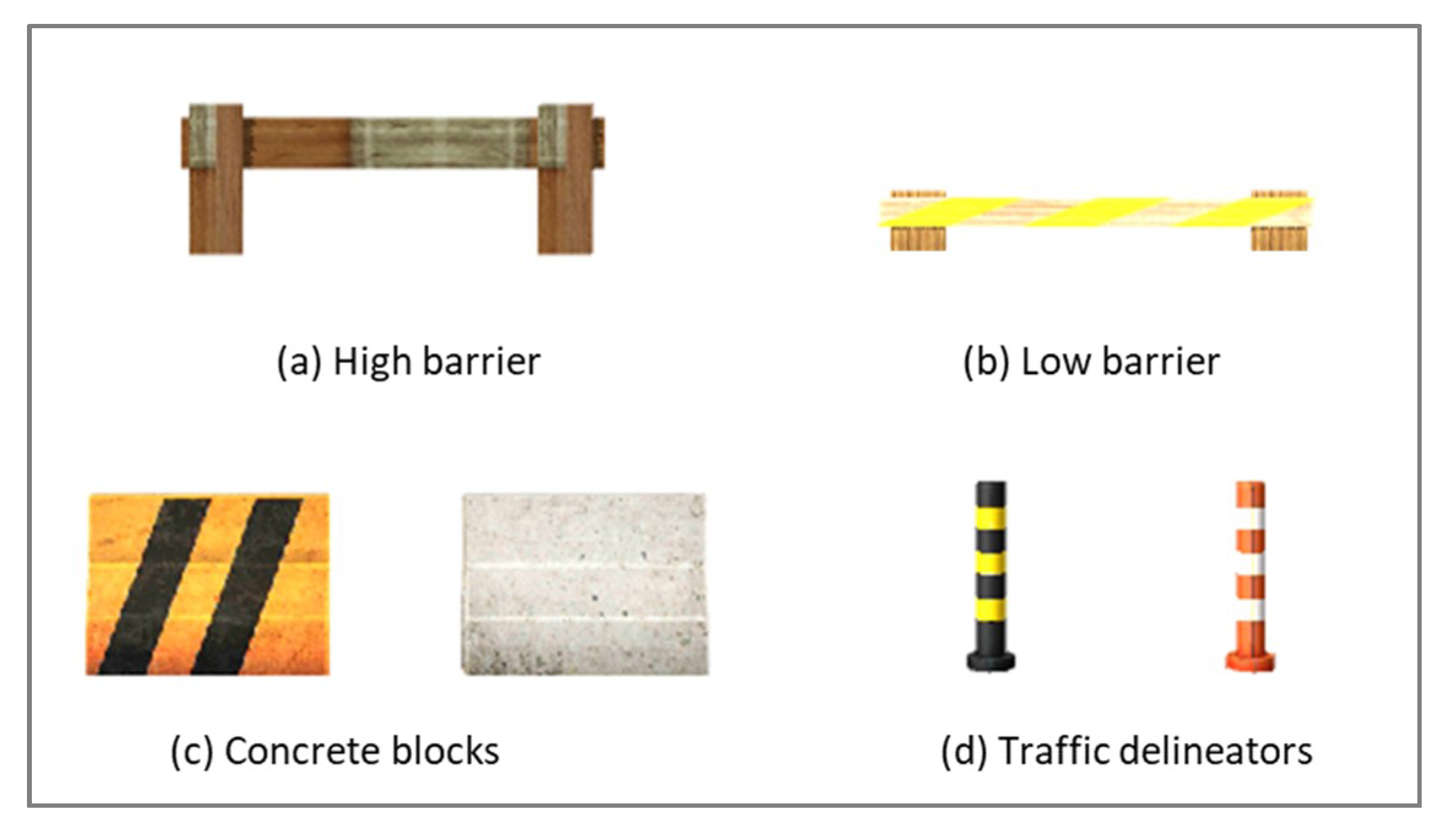
During the gameplay, the player will face one challenge which is avoiding different obstacles. There are four obstacles, as shown in (Figure 4): (a) high road barriers, (b) low road barriers, (c) concrete blocks and (d) traffic delineators. The game starts with the rabbit walking on a village road in a straight-line. The Rabbit can jump and roll to avoid low/high road barriers. To avoid concrete blocks, it shall move left/right. To pass between the traffic delineators the Rabbit must rotate to the left or right.
Figure 4. RabbitRun game obstacles.
The player controls the Rabbit using four therapeutic exercises for LBP. The exercise selection was based on the literature as well as by conducting a focus group with four physiotherapists. The four exercises are shown in (Figure 5), which includes (a) trunk flexion (forward bending), (b) trunk extension (backward bending), (c) lateral flexion and (d) trunk rotation. Each exercise is mapped to one game challenge e.g. to avoid the concrete block, the player has to perform lateral flexion exercise to move the Rabbit to the left or right. Table 2 shows the mapping of the four exercises to the game’s challenges as well as the four movements of the Rabbit during the game.
Figure 5. The four therapeutic exercises that will be performed to play the game.
Table 2. Mapping the game challenges to the player movements.
The game will show or hide the obstacles based on the exercise list that was selected in the game settings. The number of occurrences of the obstacles is determined by the number of repetitions per exercise from the settings.
The player gets one coin for each obstacle (s)he avoided. When the player collides with an obstacle his/her health bar will be decreased by one. The player wins the game if (s)he collected a specified number of coins (number of exercises × number of repetitions − 3). The game is terminated when the rabbit hits an obstacle more than three times.
The game has three difficulty levels. Each level requires the player to perform the movement in a specified Range of Motion (ROM). The range of motion can be measured by the degree of the angle. The selection of the angle degrees is based on the active ROM [26] as well as by consulting two physiotherapists. The difficulty level will be increased automatically when the player achieved the target score. The target score is equal to the number of repetitions multiplied by the frequency multiplied by the number of days. A screen will be shown to the player to inform him/her that the game level has been upgraded.

3.3.4. Motion Tracking

To move the rabbit, the player has to perform four movements. The movements are detected by the gyroscope (Gyro) sensor embedded in the smartphone. The gyroscope measures the rotation angle around the three-axis X, Y and Z (roll, pitch and yaw, respectively).
To captures the device orientation, we need to use the gyroscope sensor. The Gyro sensor tracks the rotation of the device around the three-axis x, y, z and it gives us the angular velocity (ῶ) which is the change of the angle around the axis over the time (degree/second). However, the angle rate is not useful in our case, therefor we need to calculate the angular position at a given time. The simplest way to calculate the angle is by integrating the angular velocity (ῶ) [27]:
θ   ( t ) = 0 t θ   d t  
θ   ( t + d t ) =   θ   ( t ) +   θ × d t
Equation (2) is the result of the integration of Equation (1), where θ   ( t + d t )   is the current angle, θ   ( t )   is the last measured angle, ῶ is the angular velocity measured by the Gyro sensor multiplied by a timestep.
Although it is easy to obtain the angle from the gyroscope sensor, high and fast data changes may cause a drift. The drift results in not returning the value of the sensor to 0 even if it returns to its initial position. Also, using Gyro would not give a smooth motion since it solely calculate the rotation in respect to the device itself, whereas, taking the acceleration of the movement would result in more accurate motion.
Sensor fusion is one way to solve the above-mentioned problems. Sensor fusion is combining data from several sensors to calculate accurate position and orientation information for the purpose of improving application or system performance. We can achieve accurate position and orientation information by combining data from gyroscope with accelerometer and magnetometer sensors. Combining data from multiple sensors corrects for the deficiencies of the individual sensors.
Unit quaternions is a representation of the orientation of the fused data from gyroscope, accelerometer and magnetometer. It is one mathematical representation for the orientation of the device. Euler Angles and Rotation can also be used to represent the orientation. Quaternions can be represented in Equation (3), where q0 is the angle of rotation and q1, q2, q3 are the vector x, y, z of 3-dimensional space.
Q   =   ( q 0 ,   q 1 ,   q 2 ,   q 3 )
The rotation around the x-axis (Roll), y-axis (Pitch) and z-axis (Yaw) can be calculated from quaternions using Equation (4), Equation (5) and Equation (6), respectively [28].
R o l l = a r c t a n   2   ( q 0   q 1   +   q 2   q 3 ) 1     2   ( q 1   q 1   +   q 2   q 2 )
P i t c h =   a r c t a n   2   ( q 0   q 2     q 3   q 1 )
Y a w =   a r c t a n   2   ( q 0   q 3   +   q 1   q 2 ) 1     2   ( q 2   q 2   +   q 3   q 3 )
These three rotation angles were used to control the game avatar (the rabbit). If the roll is greater than or equals a threshold, the rabbit will jump. If it is less than or equals a threshold, the rabbit will roll. The pitch angle is used to move the rabbit to the left or right. To rotate the rabbit, we used the value of the yaw angle.

3.3.5. Calibration

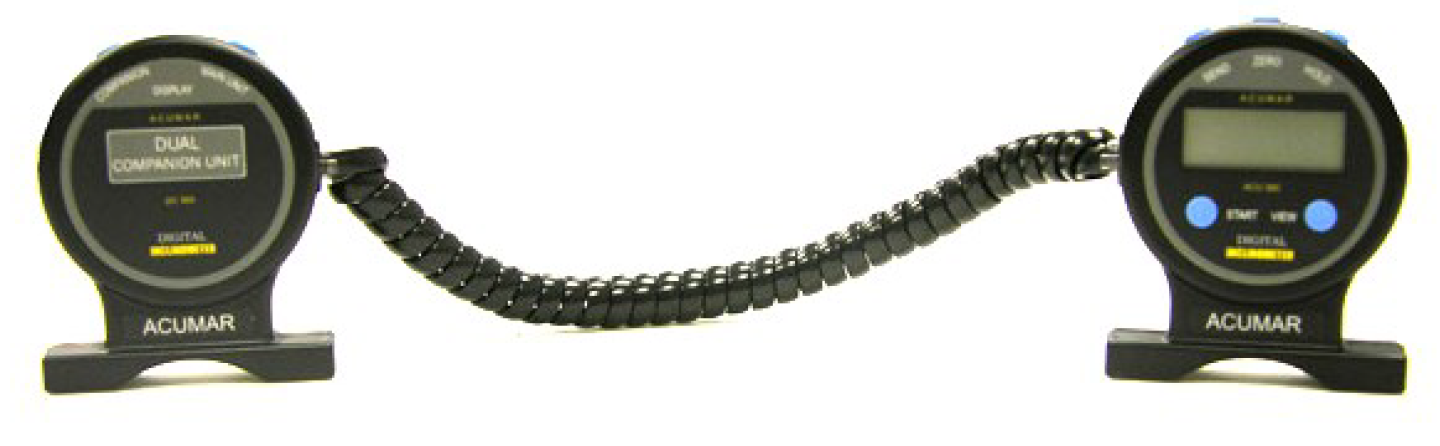
The game has three difficulty levels. Each level requires the player to perform the movement in a specified range of motion (ROM). To map the calculated angles from the mobile with the trunk ROM we used Acumar Dual Inclinometer device (Figure 6) [29]. The device was used during the implementation to determine a threshold of the roll, pitch and yaw calculated by the Gyro sensor on the smartphone. We measured the actual trunk angles using the device and compared it with the mobile readings for 5 normal people. We asked them to performer each exercise while wearing the mobile device inserted into the VR device. We monitor the Acumar Dual Inclinometer device and ask them to stop if it reached the required ROM. Then, we asked them to give us the number that appears to them in the mobile. The numbers are the values of the rotation angles of the mobile i.e. roll, pitch and yaw.
Figure 6. Acumar Dual Inclinometer device [29].
The table below (Table 3) shows the degree of the angles that are required for each exercise in each level, the values of each rotational angle and the rabbit movement if the value reached the threshold. The selection of the angle degrees is based on the active ROM [26] as well as by consulting two physiotherapists.
Table 3. The required range of motion (ROM) for each exercise for [level1, level2, level3], the name of the calculated rotational angle, the threshold values of the rotational angle that is required to move the rabbit for [level1, level2, level3] and the rabbit movement.

3.4. Usability Evaluation

3.4.1. Purpose

We have conducted a usability evaluation to measure the effectiveness and the overall user satisfaction. Effectiveness refers to the accuracy and completeness with which users achieve specified goals. User satisfaction refers to the comfort and acceptability of use. Metrics are used to quantify usability during the usability evaluation of software, websites and applications. The effectiveness can be measured using two metrics: task completion rate and the average number of errors per task. Satisfaction is measured by giving a questionnaire to each test participant at the end of the test session. This will allow us to measure their overall impression of the system being tested.

3.4.2. Participants

Overall, seven healthy participants were recruited from King Saud University. The participants included master and undergraduate students and employees. They are female, between the ages of 22–24 years. Half of the participants have had an experience in playing kinetic games like Wii, Xbox. Most of the participants had never before played VR games. All test sessions were conducted at the usability lab inside the Computer and Information Sciences College at King Saud University.

3.4.3. Procedure

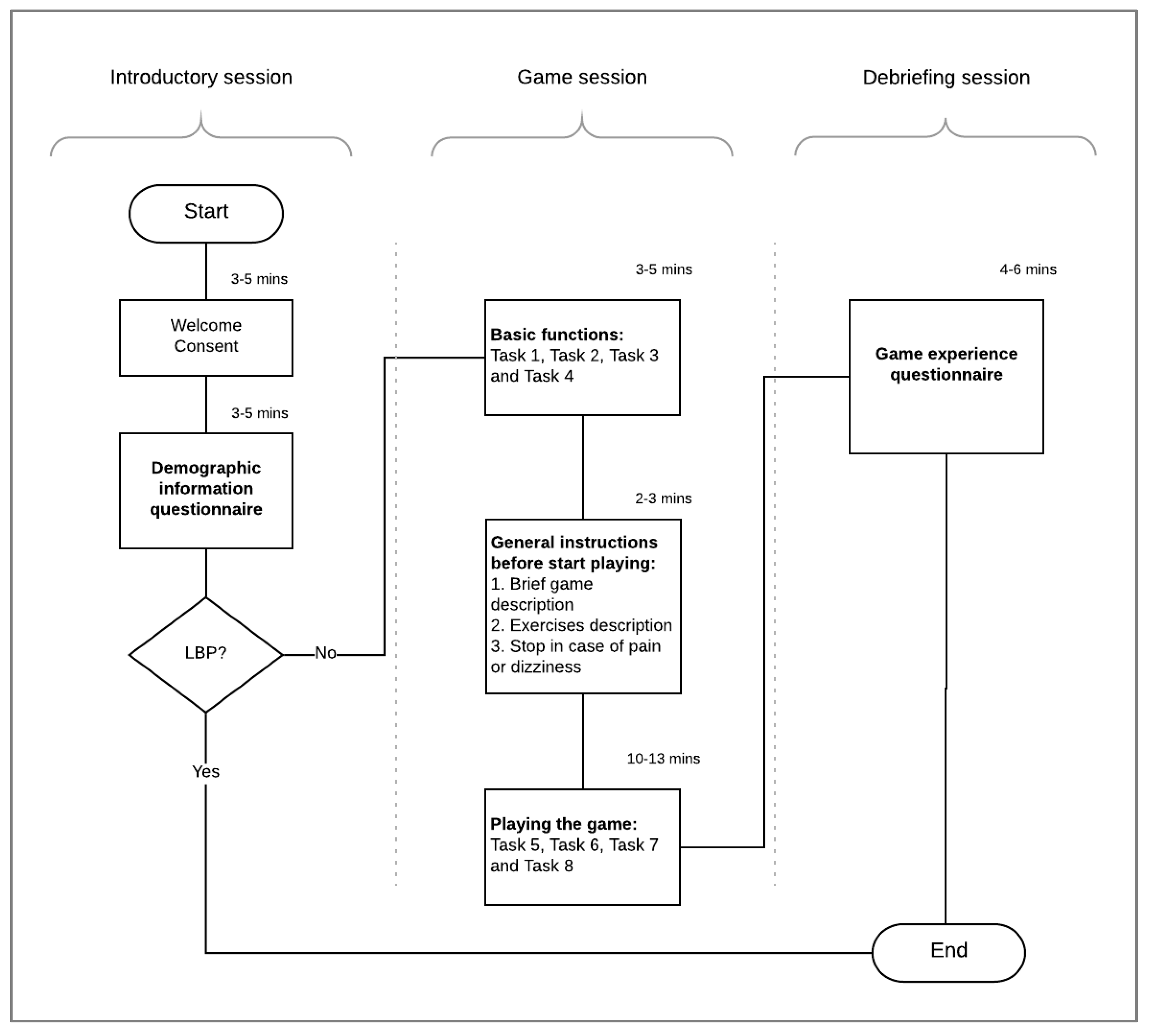
The evaluation process has three main sessions: introductory session, game session and debriefing session, as shown in Figure 7. Overall, the participants performed eight tasks (Table 4). In the introductory session, we welcome the participants, give them a brief description of the project. Then, we ask them to read and sign the informed consent form. Next, the participants are asked to fill a demographic questionnaire to collect background data about the participant such as gender, age, and VR and Kinect game experience. If the participant has a low back pain, then (s)he will be excluded from the evaluation.
Figure 7. Evaluation process flowchart.
Table 4. Evaluation tasks’ Description.
The game session is where the participant is actually interacting with the game. First, we ask the participants to perform the four basic tasks include the registration, edit the user profile, edit the game setting, view the exercises history report and send a copy of the report via email. Then, we give them general instructions before start playing the game. Instructions include what is the game, what they are going to control in the gameplay and how to control it. Also, we ask them to stop at any time if they feel pain or dizziness. Next, they were asked to start playing the game which includes four tasks. The first task is performing the game calibration and reading the instructions about how to play the game. Then, for the remaining three tasks the participant is asked to play the game in three different game settings. The first round, the participant played three repetitions of the flexion-extension exercise. Then, (s)he is asked to play three repetitions of the lateral tilt exercise. The last task is to perform three repetitions of the trunk rotation exercise.
In the last session, we ask the participants to fill the game experience questionnaire. The game experience survey is used to measure the overall participants’ satisfaction and impression of the game [12].
We collected performance and preferences data during the evaluation. Performance data were collected by the observation of the participants during executing that tasks. Performance data includes the number of errors per task and whether the task has been completed successfully or not. The data were used to measure the effectiveness of the game. Preferences data were collected using demographics and game experience questionnaires.

4. Results

4.1. Formative Evaluation

To improve the game design and performance of the game, we conducted a formative evaluation in the middle of the development. Four healthy people were recruited, and they were asked to try the game with all of its features. Many modifications have been done to improve the game based on their suggestions. In the “how to play” screen, all exercises were shown to the player; players suggested adapting the instructions based on the game setting, i.e. showing instructions only for the exercises that will be played in the game. Many of the participants stated that the button of sending the report via email was difficult to find, and they suggested to add the send button inside the report instead of the main menu. To start the game, the player must click a button for one second, the participants suggested to start the game automatically after three seconds of the instructions without clicking a button. In the “edit profile” page, the issue was when updating the user profile, all the information needs to be updated otherwise it will not be saved. It has been changed to allow changing only one field.

4.2. Usability Evaluation

4.2.1. Game Effectiveness

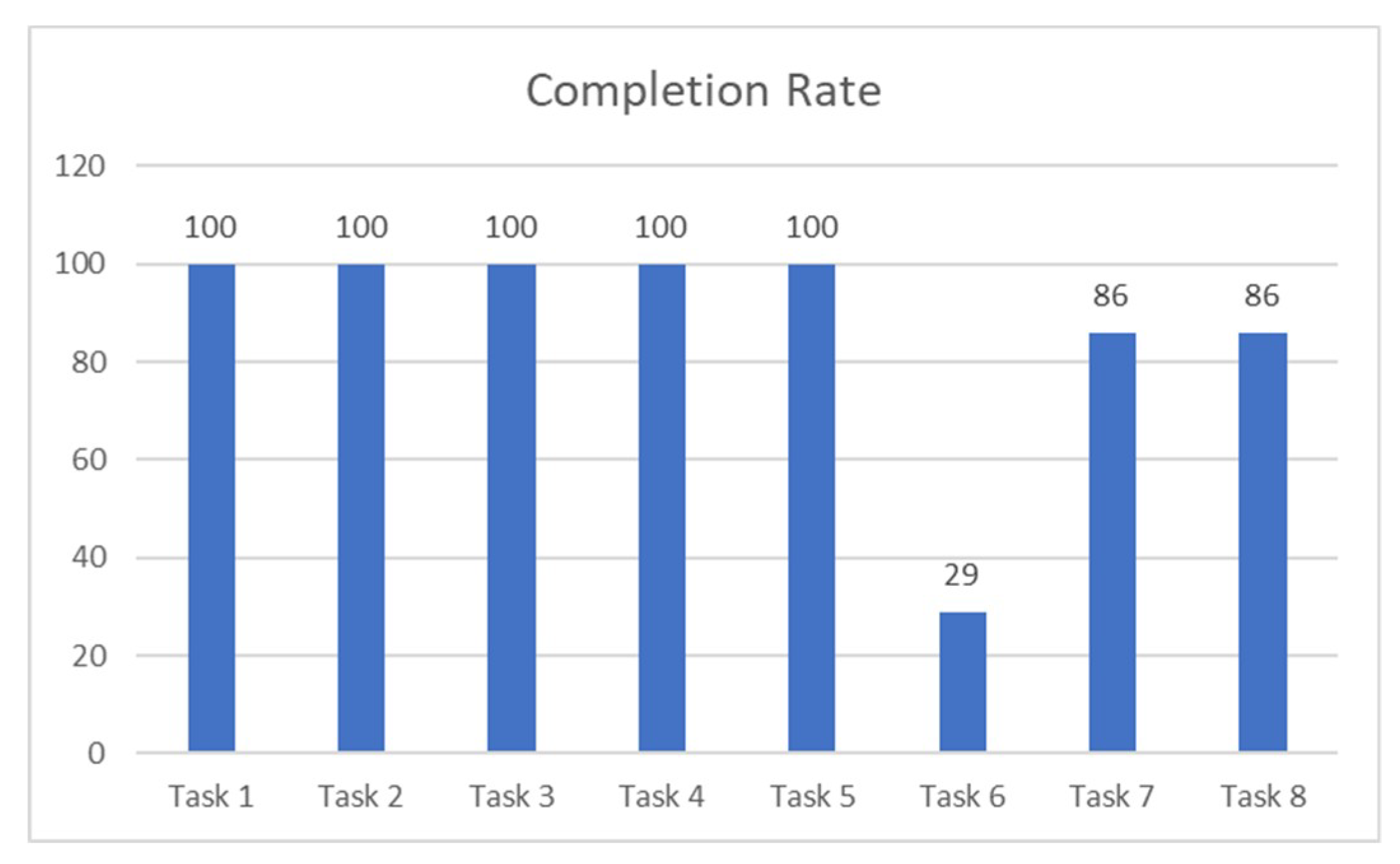
The completion rate for all tasks is illustrated in Figure 8. All the participants have completed the first five tasks successfully. However, only six participants have completed task 7 and task 8 correctly, playing the game with lateral tilt and trunk rotation exercise, respectively. Task 6, playing the game with flexion-extension exercises, has the least completion rate where only two participants were able to complete the task.
Figure 8. Tasks completion rate.
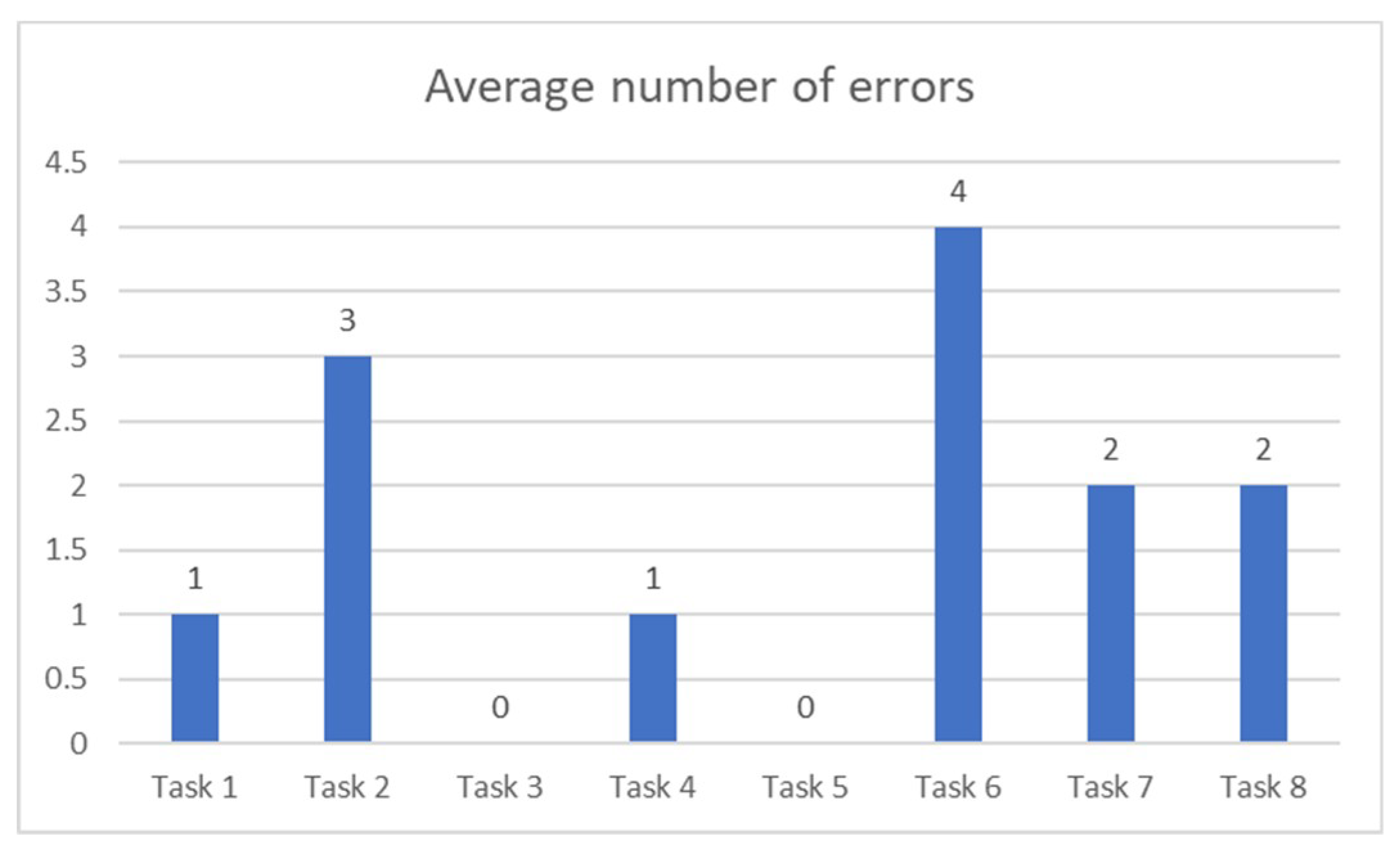
The average number of errors for each task is shown in Figure 9. All the participants have completed task 3 and 5, edit game settings and calibration, without any errors. Also, on average, most of the participants were able to register and view/send the history report (task 1 and 4) with only one error. Most of them were trying to login with their username and password while the right way is to login using the email address and the password. For task 2, updating the user profile, most of the participants get confused and clicked the game setting button instead of the user profile. For task 7 and 8, playing the game with lateral tilt and trunk rotation exercise, most of the participants won the game with two hits on average. However, all participants who have won the flexion-extension game (task 6) have hit an obstacle for three times during the gameplay.
Figure 9. Average number of errors per task.
Playing the game with flexion and extension exercises was the least effective task. The tasks order in which the participants were performing the tasks might affect the results. For future studies, the transfer of learning can be eliminated by making the participants performing the tasks interchangeably. Also, another reason for the deficiency might be because task 6 has actually two exercises, trunk flexion and trunk extension, and each one has different metaphor within the gameplay. Moreover, unlike the lateral tilt and rotation exercises where the avatar movements are aligned with the exercise, the extension exercise (backward bending) is being used to jump (moving upward) the avatar.

4.2.2. User Satisfaction

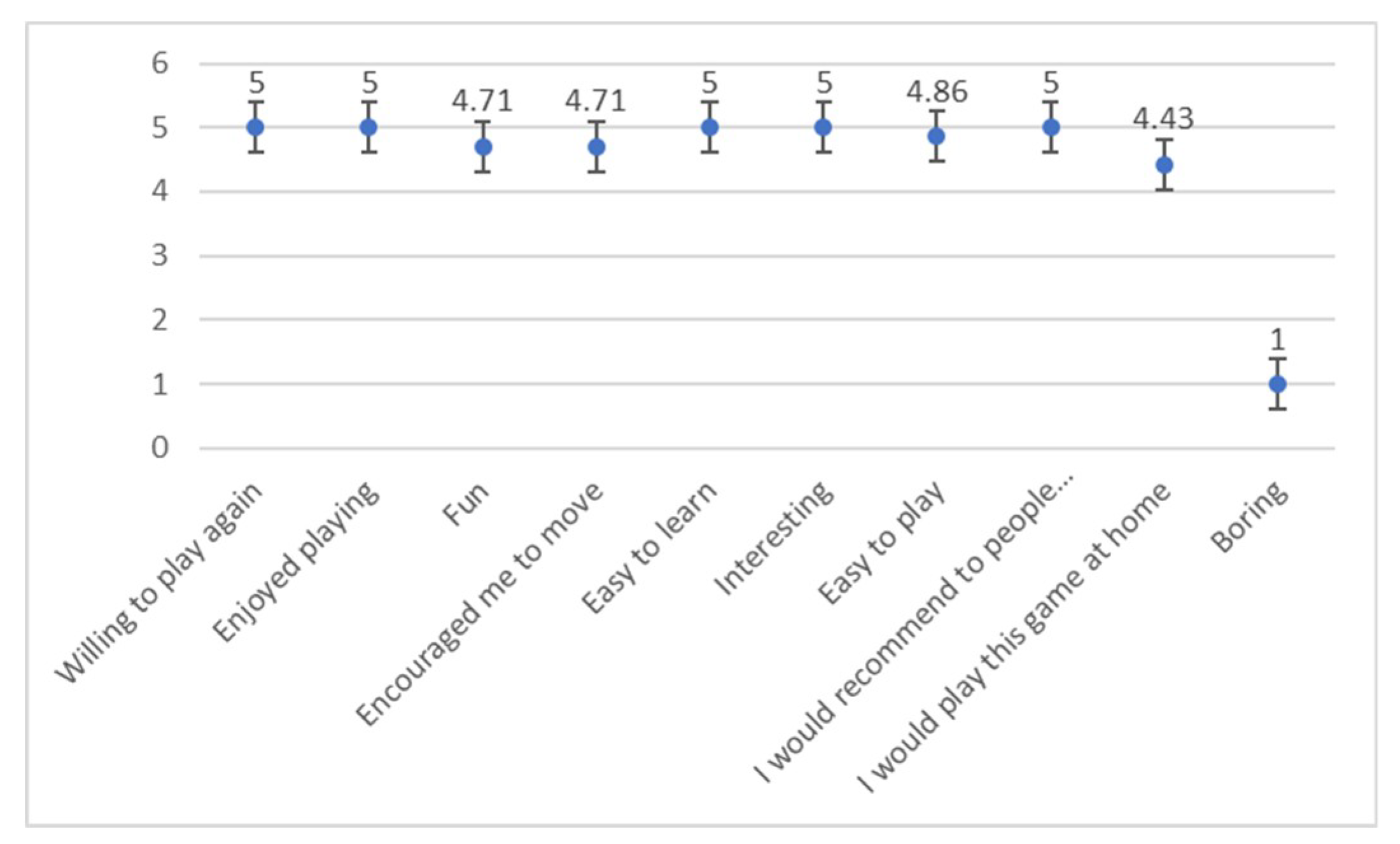
The game experience survey revealed that the participants enjoyed playing the game. They thought that it was easy for them to lean and play the game. The majority of the participants were willing to play the game again and even at their homes. The game motivated them to move and they would highly recommend the game to other people with low back pain (Figure 10). After the 14 items, the participants were asked four open-ended questions about what they liked the least and the most about the game. Also, they were asked to suggest general improvements. The participants stated that the game was fun and easy to learn. They suggested to improve the user interfaces and to add more exercises. One participant implied that the first game (task 6) was frustrating and difficult to accomplish.
Figure 10. Participant ratings of gameplay experience (1 = strongly disagree, 2 = disagree, 3 = natural, 4 = agree, 5 = strongly agree).

5. Discussion

5.1. Principal Findings

The main objective of rehabilitation is to improve the quality of individuals daily activates independence. Virtual Reality facilitates motor learning and improves motor function by providing customized training, repetition intensity, multimodal feedback and motivation [30]. Game based on VR promote entertainment, thereby allowing the patients to make repetitive motor practice and increase exercise adherence [31], as well as diverting attention from the pain [32]. Not to mention that the use of VR systems can reduce the rehabilitation cost [17]. Immersive VR has been used as a distraction technique to reduce various pain intensity using an immersive VR device as an output device to increase the sense of presence in the virtual world [19]. Existing VR interventions for LBP rehabilitation were based on a non-immersive VR, whereas to effectively reduce the pain intensity, we need an immersive VR.
The initial results of this study suggest that the immersive VR game was enjoyable and acceptable by the participants. The game was easy to play and learn and most of the participants were willing to play the game at home. Most of them would also recommend LBP patients to play the game because they thought that the game has motivated them to move.

5.2. Limitations and Future Directions

The evaluation has included only healthy participants, and all of them were women. A usability evaluation on LBP patients with different gender may be investigated since they have an important influence on the results. Many different tests, experiments and improvements have been left for the future. A randomized controlled trial on low back pain patients can be conducted to evaluate the effectiveness of using such intervention in reducing the pain as well as improving the motor functions.
Furthermore, the game can be improved by adding more functions such as the adjustment of the hold time, reminders, and exercise learning and correction. Also, it can be improved by updating the history report to include which exercises are not being done correctly by the patient. In addition, evaluating the accuracy of the rotational angles might need to be explored; it could be interesting to employ an external sensor to detect the trunk movements rather than using the mobile sensors which might result in more accurate values. A comparison of the accuracy of the two methods might also be investigated.

5.3. Conclusions

In this study, we introduced the design, development and evaluation of a RabbitRun exercise game for LBP rehabilitation. The implemented game will engage LBP patients in a virtual environment and distract them from the pain while performing LBP exercises. The game can be played on Android and iOS mobile platforms and utilize an affordable VR device such as Google Cardboard, to be easily adapted and used by the patients at their home. The initial usability evaluation results suggest that our immersive VR game for people with LBP was enjoyable and acceptable by the participants. The game was easy to learn and play and most of the participants were willing to play the game at home. Most of them would also recommend LBP patients to play the game because they thought that the game has motivated them to move. The significance of this study is to improve the quality of life for LBP patient, because it will help them adhere to their home exercises, therefore improving their motor function and reducing the pain intensity. Moreover, it will reduce the treatment cost and the work absence, which increases economy.

Author Contributions

Conceptualization, Amal Alazba, Hend Al-Khalifa and Hana AlSobayel; Data curation, Amal Alazba; Formal analysis, Amal Alazba; Investigation, Amal Alazba; Methodology, Amal Alazba, Hend Al-Khalifa and Hana AlSobayel; Software, Amal Alazba; Supervision, Hend Al-Khalifa and Hana AlSobayel; Validation, Amal Alazba, Hend Al-Khalifa and Hana AlSobayel; Writing—original draft, Amal Alazba; Writing—review and editing, Hend Al-Khalifa and Hana AlSobayel.

Funding

This research received no external funding.

Acknowledgments

We would like to thank the physiotherapists Hussein Alkhoetm, Majid Alshammari, Nawal Alghadeer and Asma Bahma, from the rehabilitation department at King Khalid University Hospital for helping us in analyzing the game requirements.

Conflicts of Interest

The authors declare no conflict of interest.

References

  1. GBD 2016 Disease and Injury Incidence and Prevalence Collaborators. Global, regional, and national incidence, prevalence, and years lived with disability for 328 diseases and injuries for 195 countries, 1990-2016: A systematic analysis for the Global Burden of Disease Study 2016. Lancet Lond. Engl. 2017, 390, 1211–1259. [Google Scholar] [CrossRef]
  2. Freburger, J.K.; Holmes, G.M.; Agans, R.P.; Jackman, A.M.; Darter, J.D.; Wallace, A.S.; Castel, L.D.; Kalsbeek, W.D.; Carey, T.S. The Rising Prevalence of Chronic Low Back Pain. Arch. Intern. Med. 2009, 169, 251–258. [Google Scholar] [CrossRef] [PubMed]
  3. Dagenais, S.; Caro, J.; Haldeman, S. A systematic review of low back pain cost of illness studies in the United States and internationally. Spine J. Off. J. N. Am. Spine Soc. 2008, 8, 8–20. [Google Scholar] [CrossRef] [PubMed]
  4. Delitto, A.; George, S.Z.; Van Dillen, L.R.; Whitman, J.M.; Sowa, G.; Shekelle, P.; Denninger, T.R.; Godges, J.J. Orthopaedic Section of the American Physical Therapy Association. Low Back Pain. J. Orthop. Sports Phys. Ther. 2012, 42, A1–A57. [Google Scholar] [CrossRef] [PubMed]
  5. Qaseem, A.; Wilt, T.J.; McLean, R.M.; Forciea, M.A. The Clinical Guidelines Committee of the American College of Physicians. Noninvasive Treatments for Acute, Subacute, and Chronic Low Back Pain: A Clinical Practice Guideline from the American College of Physicians. Ann. Intern. Med. 2017, 166, 514. [Google Scholar] [CrossRef] [PubMed]
  6. Malmivaara, A.; Pohjolainen, T.; Hirvensalo, E.; Jousimaa, J. Low Back Pain. EBM Guidelines. Available online: http://www.ebm-guidelines.com/ebmg/ltk.free?p_artikkeli=ebm00435#s5 (accessed on 3 November 2017).
  7. Koes, B.W.; van Tulder, M.; Lin, C.-W.C.; Macedo, L.G.; McAuley, J.; Maher, C. An updated overview of clinical guidelines for the management of non-specific low back pain in primary care. Eur. Spine J. 2010, 19, 2075–2094. [Google Scholar] [CrossRef] [PubMed]
  8. Meucci, R.D.; Fassa, A.G.; Faria, N.M.X. Prevalence of chronic low back pain: Systematic review. Rev. Saúde Pública 2015, 49, 1. [Google Scholar] [CrossRef] [PubMed]
  9. Duthey, B. Background Paper 6.24 Low Back Pain; World Health Organization: Geneva, Switzerland, 2015. [Google Scholar]
  10. Vlaeyen, J.W.; Linton, S.J. Fear-avoidance and its consequences in chronic musculoskeletal pain: A state of the art. Pain 2000, 85, 317–332. [Google Scholar] [CrossRef]
  11. Li, A.; Montaño, Z.; Chen, V.J.; Gold, J.I. Virtual reality and pain management: Current trends and future directions. Pain Manag. 2011, 1, 147–157. [Google Scholar] [CrossRef] [PubMed]
  12. Thomas, J.S.; France, C.R.; Applegate, M.E.; Leitkam, S.T.; Walkowski, S. Feasibility and Safety of a Virtual Reality Dodgeball Intervention for Chronic Low Back Pain: A Randomized Clinical Trial. J. Pain Off. J. Am. Pain Soc. 2016, 17, 1302–1317. [Google Scholar] [CrossRef] [PubMed]
  13. Bonnechère, B.; Sholukha, V.; Omelina, L.; Jansen, B.; Jan, S.V. Validation of Trunk Kinematics Analysis Through Serious Games Rehabilitation Exercises Using the KinectTM Sensor. In Proceedings of the 4th Workshop on ICTs for Improving Patients Rehabilitation Research Techniques, Lisbon, Portugal, 13–14 October 2016; pp. 45–48. [Google Scholar]
  14. Ciabattoni, L.; Ferracuti, F.; Lazzaro, G.; Romeo, L.; Verdini, F. Serious gaming approach for physical activity monitoring: A visual feedback based on quantitative evaluation. In Proceedings of the 2016 IEEE 6th International Conference on Consumer Electronics—Berlin (ICCE-Berlin), Berlin, Germany, 5–7 September 2016; pp. 209–213. [Google Scholar]
  15. Bonnechére, B.; Jansen, B.; Omelina, L.; Da Silva, L.; Mouraux, D.; Rooze, M.; Van Sint, J.S. Patient follow-up using Serious Games. A feasibility study on low back pain patients. In Games for Health: Proceedings of the 3rd European Conference on Gaming and Playful Interaction in Health Care; Schouten, B., Fedtke, S., Bekker, T., Schijven, M., Gekker, A., Eds.; Springer Fachmedien Wiesbaden: Wiesbaden, Germany, 2013; pp. 185–195. [Google Scholar]
  16. VICON. Motion Capture Systems; VICON, 23 November 2017; Available online: http://www.vicon.com (accessed on 23 November 2017).
  17. Khan, M.I.; Prado, A.; Agrawal, S.K. Effects of Virtual Reality Training with Trunk Support Trainer (TruST) on Postural Kinematics. IEEE Robot. Autom. Lett. 2017, 2, 2240–2247. [Google Scholar] [CrossRef]
  18. Su, W.-C.; Yeh, S.-C.; Lee, S.-H.; Huang, H.-C. A Virtual Reality Lower-Back Pain Rehabilitation Approach: System Design and User Acceptance Analysis. In Universal Access in Human-Computer Interaction. Access to Learning, Health and Well-Being; Springer: Cham, Switzerland, 2015; pp. 374–382. [Google Scholar]
  19. Hoffman, H.G.; Chambers, G.T.; Meyer, W.J.; Arceneaux, L.L.; Russell, W.J.; Seibel, E.J.; Richards, T.L.; Sharar, S.R.; Patterson, D.R. Virtual reality as an adjunctive non-pharmacologic analgesic for acute burn pain during medical procedures. Ann. Behav. Med. Publ. Soc. Behav. Med. 2011, 41, 183–191. [Google Scholar] [CrossRef] [PubMed]
  20. Tashjian, V.C.; Mosadeghi, S.; Howard, A.R.; Lopez, M.; Dupuy, T.; Reid, M.; Martinez, B.; Ahmed, S.; Dailey, F.; Robbins, K.; et al. Virtual Reality for Management of Pain in Hospitalized Patients: Results of a Controlled Trial. JMIR Ment. Health 2017, 4, e9. [Google Scholar] [CrossRef] [PubMed]
  21. Jin, W.; Choo, A.; Gromala, D.; Shaw, C.; Squire, P. A Virtual Reality Game for Chronic Pain Management: A Randomized, Controlled Clinical Study. Stud. Health Technol. Inform. 2016, 220, 154–160. [Google Scholar] [PubMed]
  22. Jones, T.; Moore, T.; Choo, J. The Impact of Virtual Reality on Chronic Pain. PLoS ONE 2016, 11, e0167523. [Google Scholar] [CrossRef] [PubMed]
  23. Unity. Available online: https://unity3d.com (accessed on 4 May 2018).
  24. Visual Studio IDE, Code Editor, VSTS, & App Center. Visual Studio. Available online: https://www.visualstudio.com/ (accessed on 4 May 2018).
  25. Quickstart for Google VR SDK for Unity with Android|Google VR. Google Developers. Available online: https://developers.google.com/vr/develop/unity/get-started-android (accessed on 4 May 2018).
  26. Active Range of Motion. Lumbar Spine Assessment. 3 October 2012. Available online: https://lumbarspineassessment.wordpress.com/examination/active-range-of-motion/ (accessed on 4 May 2018).
  27. Wetzstein, G. Inertial Measurement Units II. [PowerPoint presentation], EE267: Virtual Reality, Stanford University. April 2018. Available online: http://stanford.edu/class/ee267/ (accessed on 4 May 2018).
  28. Paladugu, P.; Hernandez, A.; Gross, K.; Su, Y.; Neseli, A.; Gombatto, S.; Moon, K.; Ozturk, Y. A sensor cluster to monitor body kinematics. In Proceedings of the 2016 IEEE 13th International Conference on Wearable and Implantable Body Sensor Networks (BSN), San Francisco, CA, USA, 14–17 June 2016; pp. 212–217. [Google Scholar]
  29. Acumar Dual Inclinometer for Joint Measurement|Human Evaluation by Lafayette Instrument Company. Available online: http://lafayetteevaluation.com/products/acumar-dual-inclinometer (accessed on 4 May 2018).
  30. Crocetta, T.B.; de Araújo, L.V.; Guarnieri, R.; Massetti, T.; Ferreira, F.H.I.B.; de Abreu, L.C.; Monteiro, C.B.d. Virtual reality software package for implementing motor learning and rehabilitation experiments. Virtual Real. 2017, 22, 199–209. [Google Scholar] [CrossRef]
  31. Palazzo, C.; Klinger, E.; Dorner, V.; Kadri, A.; Thierry, O.; Boumenir, Y.; Martin, W.; Poiraudeau, S.; Ville, I. Barriers to home-based exercise program adherence with chronic low back pain: Patient expectations regarding new technologies. Ann. Phys. Rehabil. Med. 2016, 59, 107–113. [Google Scholar] [CrossRef] [PubMed]
  32. Garrett, B.; Taverner, T.; Masinde, W.; Gromala, D.; Shaw, C.; Negraeff, M. A rapid evidence assessment of immersive virtual reality as an adjunct therapy in acute pain management in clinical practice. Clin. J. Pain 2014, 30, 1089–1098. [Google Scholar] [CrossRef] [PubMed]

Article Metrics

Citations

Article Access Statistics

Multiple requests from the same IP address are counted as one view.