


Featured Application
Requirements, guidelines, and insights on how to subtitle 3D Virtual Reality (VR) content.
Abstract
All multimedia services must be accessible. Accessibility for multimedia content is typically provided by means of access services, of which subtitling is likely the most widespread approach. To date, numerous recommendations and solutions for subtitling classical 2D audiovisual services have been proposed. Similarly, recent efforts have been devoted to devising adequate subtitling solutions for VR360 video content. This paper, for the first time, extends the existing approaches to address the challenges remaining for efficiently subtitling 3D Virtual Reality (VR) content by exploring two key requirements: presentation modes and guiding methods. By leveraging insights from earlier work on VR360 content, this paper proposes novel presentation modes and guiding methods, to not only provide the freedom to explore omnidirectional scenes, but also to address the additional specificities of 3D VR compared to VR360 content: depth, 6 Degrees of Freedom (6DoF), and viewing perspectives. The obtained results prove that always-visible subtitles and a novel proposed comic-style presentation mode are significantly more appropriate than state-of-the-art fixed-positioned subtitles, particularly in terms of immersion, ease and comfort of reading, and identification of speakers, when applied to professional pieces of content with limited displacement of speakers and limited 6DoF (i.e., users are not expected to navigate around the virtual environment). Similarly, even in such limited movement scenarios, the results show that the use of indicators (arrows), as a guiding method, is well received. Overall, the paper provides relevant insights and paves the way for efficiently subtitling 3D VR content.
1. Introduction
All multimedia services must be accessible. This is required not only to adhere to global regulation frameworks, but also to ensure global e-inclusion and equal access to information [1]. In multimedia services, accessibility is typically provided by means of access services (e.g., subtitling, audio description, and sign language interpretation), appropriate interaction modalities (e.g., user interfaces, voice control), and assistive technologies (e.g., voice readers and content processing to address specific audiovisual impairments). The study in [1] provides statistics about the percentages of the global population with some form of audiovisual impairment, and about the ageing process, which is closely related to disability rates. These statistics reveal the significant percentage of the population with accessibility needs.
Multimedia content includes audio and visual elements which, at the same time, may contain linguistic and non-linguistic components. Effective content comprehension can only be achieved by appropriately processing these audio and visual elements. However, this is unfortunately not possible for the full spectrum of consumers without the provision of access services. One of the most closely explored and adopted access services among the traditional audiovisual services is subtitling. Subtitling is not only an essential service for the interpretation of audio information for the deaf and hard-of-hearing (SDH) [2,3], but has also become a powerful tool for the hearing audience whose barrier is linguistic rather than sensorial (interlingual subtitles) [4]. Furthermore, subtitles can provide benefits in a variety of scenarios and contexts, such as in educational and training environments, in cultural applications, as an assistive tool for (language) learning scenarios and users with cognitive impairments, and in noisy/public environments where the audio cannot (but should be) heard [5]. Therefore, subtitles have not only become a key access service, they are also an intrinsic component of media services. As a result, subtitling is typically considered from a universal perspective, encompassing the two classical categories of subtitles: SDH (mainly intralingual, including paralinguistic information, and aimed at persons with hearing loss); and subtitles for hearing users (mainly interlingual, but with extra applicability). The current study follows this approach, but focuses the user tests on hearing participants, as a first, but relevant applicability scenario.
To date, numerous subtitling solutions for traditional 2D video content have been proposed, even including support for personalization options (e.g., [2,6,7]) and advanced presentation methods for better speaker identification (e.g., [8]). In addition, recent studies have begun to explore how accessibility, and subtitling solutions in particular, can be efficiently provided for immersive media services, such as VR360 video. Although the audiovisual content is framed on a flat 2D window in traditional video formats, in VR360 video the users have the freedom to explore omnidirectional 360° scenes. This has resulted in new challenges and requirements, as analyzed in [9].
Similar to VR360 video, 3D Virtual Reality (VR) content and services are becoming mature and highly popular, not only for entertainment, but also for many other relevant sectors, such as culture [1], communication and collaboration [10], education and training [11], and consultation and therapy [12]. However, accessibility for 3D VR content is still in its infancy. This paper, for the first time, explores two key requirements to address the challenges remaining for efficiently subtitling 3D VR content: presentation modes and guiding methods. By leveraging insights from earlier work on VR360 content (e.g., [9,13]), this paper proposes novel presentation modes and guiding methods to not only provide the freedom to explore the omnidirectional 360° scenes, but also address the additional specificities of 3D VR compared to VR360 content: depth, 6 Degrees of Freedom (6DoF), content blocking, and viewing perspectives. In particular, the paper aims to provide insights into two key Research Questions (RQ) related to the implementation of subtitling, as the most widespread access service, in 3D VR environments:
(RQ1) What are the most appropriate subtitling presentation modes in 3D VR environments?
(RQ2) Do visual indicators, such as arrows, provide benefits for guiding the users toward the target speakers in 3D VR environments?
By implementing state-of-the-art and novel alternatives, applying these to professionally created 3D VR test sequences, and running user tests with hearing users (but without audio, such that subtitles must be relied on to understand the story), the obtained results prove that always-visible subtitles and a novel proposed comic-style presentation mode are significantly more appropriate than state-of-the-art fixed-positioned subtitles, particularly in terms of immersion, ease and comfort of reading, and identification of speakers. Similarly, the obtained results show that the use of indicators (arrows), as a guiding method, is well received and provides benefits. In the adopted test sequences, the key actions happened with delimited spaces and no major displacement of speakers, and without requiring large 6DoF by the users. However, the evaluation of these test sequences is nonetheless valuable because they are applicable to, and representative of, a wide variety of use cases, such as e-learning, content watching, and sports/cultural events.
In conjunction, the contributions of this paper are expected to become a valuable resource for the audience interested in this field, including: (1) users with accessibility needs and frequent users of subtitles, to know about potential options and the options with greater acceptance; (2) the development community, content producers, and service providers, in order to improve their solutions; and (3) the standardization bodies and research community, in order to have an overall view of solved and critical missing aspects, and/or to assess the extent to which the existing requirements and guidelines are met.
The remainder of this paper is structured as follows. Section 2 briefly reviews the state-of-the-art approaches. Next, Section 3 describes the proposed and implemented solutions, and the adopted 3D VR content as stimuli for the tests. Section 4 presents the methodology for the user tests and the obtained results. Section 5 provides a discussion about the obtained results and insights. Finally, Section 6 provides the conclusions and ideas for future work.
2. Related Work
This section reviews the state-of-the-art research with regard to subtitling solutions for traditional 2D video, VR360 video, and 3D VR content.
2.1. Traditional 2D Video Subtitling
In recent years, research efforts on technological and user experience aspects for subtitles have mostly focused on traditional 2D video, addressing a variety of key aspects, as reviewed in [2]. Relevant examples are: positioning (e.g., [14]); representation of non-speech information (e.g., [15]); reading speed (e.g., [16]); presentation methods for better speaker identification (e.g., [8]); and personalization (e.g., [2]). Although most of these studies focused on TV-related services, a small number also focused on live events, such as opera performances (e.g., [17]).
2.2. Traditional 2D Video Subtitling
Research studies on VR360 video subtitling have also recently emerged, due to the increasing popularity of this immersive medium [1].
First, a study carried out by BBC [18] compared four alternatives for subtitle presentation modes: (i) Fixed-positioned (evenly spaced): subtitles are equally spaced with a separation of 120° in a fixed position below the eye line; (ii) Follow head immediately or Always-visible: subtitles are always displayed in front of the viewer, and follow him/her when looking around; (iii) Follow with lag: subtitles appear directly in front of the viewer, and remain there until the viewer looks somewhere else; then, the subtitles rotate smoothly to the new position in front of the viewer; and (iv) Appear in front, then fixed: subtitles appear in front of the viewer, and are then fixed until they disappear. The obtained results from the conducted user tests (n = 24 participants), using short clips, reflected that the Always-visible mode was preferred by users, mainly because: (i) subtitles were easy to locate; and (ii) viewers did not miss the subtitles when exploring the 360° environment. However, the particular implementation in [18] resulted in blocking effects (i.e., subtitles blocked important parts of the images and were considered obstructive). Second, the study in [19] also compared the first two previous presentation modes (n = 34 participants). Although no clear differences between their appropriateness and users’ preferences were identified, the issues of presence, VR sickness, and workload slightly favored the Always-visible mode. Both studies noted the need for further research on the topic, not only considering longer pieces of content and different content genres, but also exploring additional presentation modes.
An additional recent study [20] contributed with a VR360 video corpus to characterize commercially available subtitling solutions and practices, by analyzing the YouTube channels of two major providers: BBC and NYT. This analysis indicates that the Always-visible presentation mode, which appeared to be the most preferred by users, has not yet been adopted by these providers, although a few VR360 players have recently started considering it [13]. Furthermore, this analysis confirms that many key requirements for efficiently subtitling VR360 content, as analyzed in [9], are not yet met. The subtitling solutions offered to date mostly rely on burned-in subtitles added at post-processing stages, and have a much stronger focus on enhancing the narrative of the videos than on making the content accessible. Consistent with this, the study in [13] provides an analysis and categorization of the subtitling features provided by the key existing VR360 video players. It is shown that further work on this topic is needed to fulfill key requirements in this context.
Finally, the study in [9] identifies key challenges and requirements for efficiently subtitling VR360 content, and reports on a set of user tests to provide insights into the most appropriate solutions regarding key aspects: presentation modes, guiding methods, re-presentation of non-speech information, comfortable fields-of-view (FoVs), and use of easy-to-read language. First, it was shown that Always-visible subtitles provide the best user experience, but that subtitles attached-to-the-speaker are also well received and have potential, if appropriately implemented. Second, it was shown that arrows are the simplest and most intuitive method for visually guiding the user toward the target speaker.
2.3. 3D VR Content Subtitling
Recent works have reported on relevant issues related to the integration and presentation of subtitles in 3D environments. The study in [21] notes the necessity to further research means to appropriately subtitle 3D VR content. That study claims that appropriate subtitling solutions are necessary, not just to contribute to the narrative and maximize the user’s engagement and immersion, but critically to avoid the occurrence of ghosting effects that may hinder readability, and cause eyestrain and simulation sickness. These conclusions were reached after reviewing and analyzing, based on a descriptive approach, a variety of 3D-subtitled movies, using both stereoscopic video and computer-generated 3D content as the production formats. For instance, it was remarked that a non-curated super-imposition of traditional 2D subtitles on top of the 3D content can destroy the viewing experience, having an impact on the depth estimation, and causing ghosting, shadowing, and dizziness effects. An appropriate implementation can, however, minimize the impact of these issues, e.g., by positioning the subtitles close to the rendering plane, and applying appropriate lighting, shades, and colors [22].
From the analyzed corpus in [21], interesting insights were provided. Most of 3D movies place the subtitles in the perspective closest to the viewer, but are not really integrated with the movie dynamics and effects. Some of these adjust the depth of subtitles according to the scene and speaker’s location; however guidelines were not provided, and concrete patterns were not identified, for these adjustments. Interestingly, one of the analyzed movies (Avatar, Director: James Cameron, 2010) adopts a dynamic subtitling strategy based on changing the subtitles’ position depending on the location of the speaker on the screen and the type of scene, to facilitate reading and improve the tracking of the action. In essence, the study in [21] presents the need for better subtitling solutions for 3D content, exploring requirements and appropriate alternatives. The goal must be to ensure accessibility and content comprehension, but without having a negative impact on the user experience.
Similarly, an exploratory study concerning the usage of subtitles in video games was conducted in [23]. It was found that subtitles are not yet efficiently provided in the game industry. That study also highlights the need for appropriate solutions, standards, and recommendations for subtitling this relevant medium, given its interactive and immersive nature, and high dynamism. This would not only enhance game accessibility, but also improve the gaming experience for all players, in a variety of application contexts (e.g., entertainment, training, and therapy). Consistent with this, the study in [24] claimed that the appropriate subtitling solutions for VR “have the potential to make the overall viewing experience less disjointed and more immersive”.
These two last studies [21,23] have served as a motivation for conducting the research presented in the current work, which goes even one-step beyond considering 3D movies, but interactive 3D VR content with limited 6DoF, thus moving closer to the gaming sector. In particular, our work departs from the lessons learned in [9] regarding the use and benefits of presentation modes and guiding methods for VR360 video. Our aim was to examine their adoption and improvement for 3D VR, for which accessibility solutions (including subtitling) are yet nonexistent, despite their relevance.
3. Materials and Methods: Subtitling Solutions and Stimuli
This section presents the adopted and novel proposed subtitling solutions, in terms of presentation modes (Section 3.1) and guiding methods (Section 3.2). Then, it describes the VR content stimuli adopted for conducting the tests and assessing the appropriateness, benefits, and limitations of the proposed solutions (Section 3.3).
3.1. Presentation Modes
By presentation modes, we refer to how the subtitles are integrated and presented with the audiovisual content, even when exploring the immersive environment.
The two most widely implemented presentation modes for VR360 video (e.g., [9,13,18,19]) have been adapted and adopted for their adequate integration with 3D VR content:
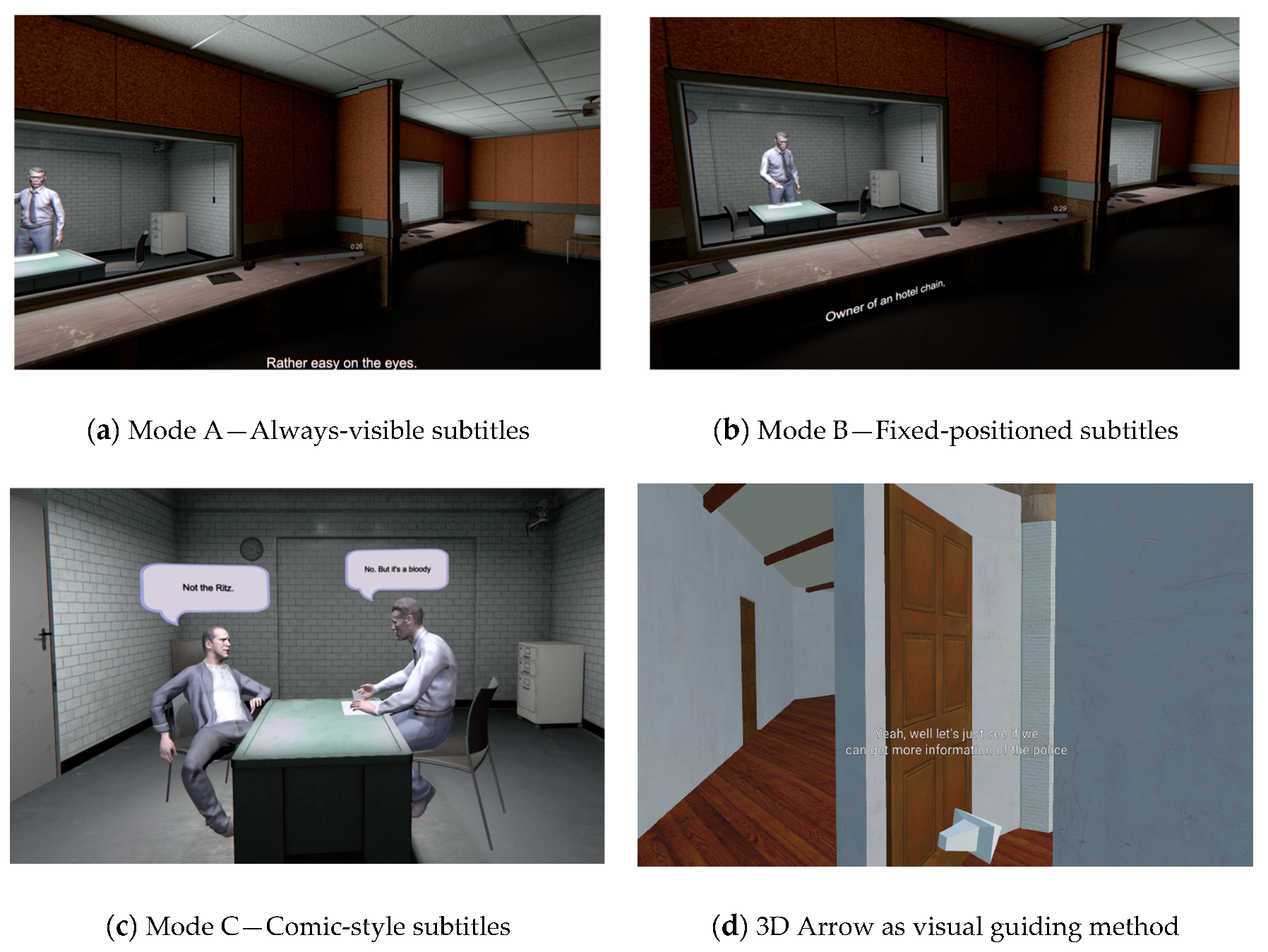
- Mode A—Always-visible subtitles: The approach for 3D VR is identical to that for VR360 content. Subtitles are attached to the virtual camera, thus being always visible at the bottom center of the FoV (although the positioning could be dynamically personalized, as in [5,9]), regardless of where the user is looking (see Figure 1, top left image).
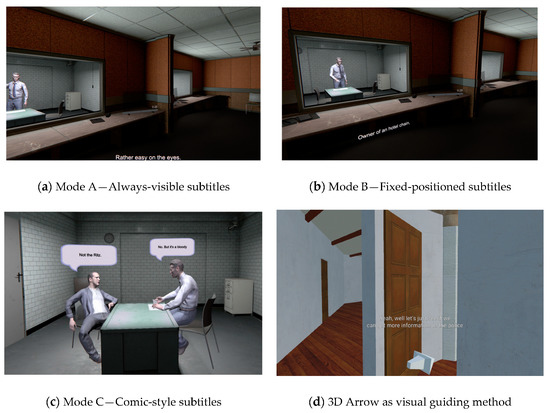 Figure 1. Adopted and Proposed 3D VR Subtitling Solutions.
 - Mode B—Fixed-positioned subtitles: Unlike in VR360 video, in which the users can just explore the 360° environment (i.e., 3DoF), 3D VR content brings a depth dimension, allowing free navigation within the environment (i.e., 6DoF). Therefore, in addition to the latitude and longitude coordinates typically used in VR360 subtitling [9], the depth dimension acquires increased relevance when implementing Fixed-positioned subtitles in 3D VR content and, for example, a 3D Cartesian coordinate system (x, y, z) needs to be adopted as the reference. However, when the speakers’ locations do not significantly vary, the implementation of this presentation mode for 3D VR content is similar to that for VR360 content (see Figure 1, top right image). This is the case of the scenarios considered in this paper, as detailed later.
In addition, previous works, such as [9,25] and the Avatar movie (Section 2), have revealed the potential of adopting more dynamic presentation modes for subtitles, by rendering them in a close position to the associated speaker. By leveraging the insights and lessons learned from these state-of-the-art implementations and studies, a third novel presentation mode is proposed in this paper:
- Mode C—Comic-style subtitles: This consists of adding bubbles associated with the speakers’ faces, like in comics, and presenting the subtitles in the planes making up these bubbles (see Figure 1, bottom left image). In this mode, the size of the bubble is slightly adjusted for an adequate fit of the active subtitles’ text. The size is not intended to vary significantly, because the characters per subtitle frame are typically limited to two lines and 40 characters per line [13,26], for any presentation mode. Similarly, because the subtitles are rendered in 2D planes, a dynamic algorithm was adopted to always render these planes orthogonally to the users’ viewing perspective to maximize readability. The bubbles are only made visible when associated subtitles need to be presented.
3.2. Guiding Methods
Regardless of the presentation mode being provided/enabled, users have the freedom to explore the 3D VR environment. During exploration and navigation, it may be the case that the active speaker is outside the current user’s FoV. Although spatial audio may support users in perceiving the location of the speaker, deaf and hard-of-hearing users cannot hear it, or the audio cannot be heard in noisy/public environments.
Therefore, appropriate visual guiding methods are additionally needed to help the users in intuitively finding the speaker or main action in the 3D VR environment when audio cues are lacking or cannot be accessed.
The study in [9] reported on a series of iterative user tests comparing visual guiding methods for VR360 video: side text, arrows, and a radar. It was shown that the use of arrows was preferred by users, and was perceived as the simplest, yet intuitive and effective, method to support finding the target speaker in the 360° environment.
The implementation for VR360 video in [9] relied on only considering the position of the speaker in the horizontal direction (latitude angle, from −180° to +180°). It was found that considering the vertical direction (longitude angle, from −90° to +90°) was not necessary because identifying the speaker in the vertical axis is highly intuitive, and it is not common to find speakers near the poles of the sphere. Therefore, the arrows simply pointed to the right or left, depending on the relative position of the speaker compared to the current user’s FoV. This was found to be sufficiently effective, and the simplest, less invasive, and most natural solution. However, this approach cannot be adopted in 3D VR content, because the users can freely explore and navigate the environment (i.e., 6DoF). Accordingly, a 3D arrow, which is able to point in all directions, was implemented in this work as the visual guiding method (see Figure 1, bottom right image). The arrow only points to the target active speaker, if any, by comparing the current user’s position (and associated FoV) to that of the speaker. The arrow is made visible each time a speaker is active, and thus subtitle frames need to be shown. Alternatively, this may by presented only when the speaker is out of the FoV and/or at a distance greater than a threshold. However, this optional feature was not enabled in the conducted tests. The position of the arrow can also be customized; however, according to the results in [9], users preferred it to be positioned close to the subtitles for easier identification and better integration.
3.3. Stimuli
To assess the appropriateness and benefits of the proposed subtitling presentation modes and guiding methods, a 3D VR content episode was adopted [27]. Although the content was originally produced for a shared video watching experiment, it was adopted in this study due to its professional quality, and the availability of a full 3D version of the episode and sufficient test sequences with the adequate length.
The VR episode begins with the murder of a celebrity, and revolves around the interrogation of two suspects. These suspects are interrogated by an inspector in the 3D scenario shown in Figure 2, in which the users watch the interrogation scenes through a one-way mirror. The virtual scenario was modelled in photorealistic 3D and the characters are represented as 3D avatars produced using a 3D scanned version of real actors, animated via the data recorded from Motion Capture (MoCap) sessions. Each interrogation scene happens in a different, but contiguous, room, and thus can be used as a different clip with a duration of 8 min.

Figure 2.
Overview of the 3D modelled and recreated VR scenario, including the layout and view of the 3D environment, the interrogation rooms and scenes, and the users’ viewpoints.
More details about the story and associated production process are provided in [27]. All assets are available as open-access on Zenodo: https://zenodo.org/communities/vrtogether-h2020 (accessed on 12 August 2021). A video describing the created VR content, and summarizing the production process is available at: https://www.youtube.com/watch?v=aHO5M1qNmjY (accessed on 12 August 2021). Finally, a demonstration video showcasing the proposed and adopted subtitling solutions when applied to this VR content episode, in addition to implications of their usage, can be watched at: https://www.youtube.com/watch?v=SzastPjzzeM (accessed on 12 August 2021) in the Supplementary Materials.
4. Results: User Tests
This section reports on the user tests conducted to determine the most appropriate subtitle presentation modes, and their advantages and disadvantages, and the potential benefits of using guiding methods, in particular arrows, pointing to the target speaker(s).
The methodology followed is explained in Section 4.1, and the results are presented in subsequent subsections.
4.1. Methodology
The user tests were divided into two parts: the first part focused on evaluating the appropriateness of the presentation modes, and the second on determining the benefits of using an arrow as a visual guiding method.
4.1.1. Test Condition: Presentation Modes
The first part of the tests explored the appropriateness of the considered 3D VR subtitling presentation modes (Modes A, B, C). Given that three presentation modes were considered, the two interrogation scenes were divided into two parts of the same length (all with a duration of ~240 s):
- Clip 1A: Initial Part of the Interrogation of suspect 1
- Clip 1B: Final Part of the Interrogation of suspect 1.
- Clip 2A: Initial Part of the Interrogation of suspect 2.
- Clip 2B: Final Part of the Interrogation of suspect 2
To avoid order effects, the presentation of test conditions was counterbalanced, such that the presentation started with the first part of the interrogation scenes, thus enabling the story to be followed adequately (Table 1). The clips were presented without audio, so that the subtitles were key to understanding the story, even if participants did not have hearing impairments.

Table 1.
Counterbalancing for Test Condition 1 (subtitling presentation modes) to avoid order effects.
4.1.2. Test Condition: Use of Guiding Methods
The second part of the tests consisted of adding a visual guiding method (arrow) that dynamically points at the target speaker, regardless of the user’s position and viewpoint. The arrows were added to the Modes B and C, in a counterbalanced manner (Table 2). This test condition was not considered for Mode A, because in this mode it may be possible that the subtitles and the target speakers are in different FoVs, and therefore the use of the indicator may cause confusion in such situations.
Table 2.
Counterbalancing for Test Condition 2 (use of guiding methods) to avoid order effects.
4.1.3. Equipment and Setup
- Gaming laptop (MSI, i7-10750H, 16 GB DDR4-2666 MHz, GeForce® GTX 1660 Ti, GDDR6 6 GB).
- VR headset: Oculus Quest connected to the laptop via the Oculus link cable.
- Noise cancelling headphones
The participants sat in a comfortable swivel chair in a spacious room, with appropriate lighting and temperature, and with only the presence of the experiment facilitator.
4.1.4. Procedure
- Step 1 (~5 min). Participants are welcomed, and introduced to the test.
- Step 2 (~3 min). Participants fill in a consent form.
- Step 3 (~3 min). Participants fill in a demographic and background information questionnaire.
- Step 4 (~3 min). Participants fill in the Simulation Sickness Questionnaire (SSQ) [28].
- Step 5 (~5 min). Part 1—First Test Condition.
- Step 6 (~5 min). Participants fill in the Igroup Presence Questionnaire (IPQ) [29] and SSQ questionnaires.
- Step 7 (~5 min). Part 1—Second Test Condition.
- Step 8 (~5 min). Participants fill in the IPQ and SSQ questionnaires
- Step 9 (~5 min). Part 1—Third Test Condition
- Step 10 (~5 min). Participants fill in the IPQ and SSQ questionnaires
- Step 12 (~5 min). Participants fill in the ad-hoc questionnaire on subtitling presentation modes.
- Step 13 (~5 min). Part 2—First Test Condition.
- Step 14 (~5 min). Part 2—Second Test Condition.
- Step 15 (~5 min). Participants fill in the ad-hoc questionnaire on indicators.
- Step 16 (~5 min). Participants are thanked and said goodbye
Before each test condition, the experiment facilitator helped the participants with the setting and location of the VR equipment, and launched the experience.
Overall, the duration of the test session for each user was between 60 and 80 min.
4.1.5. Forced Camera Movements
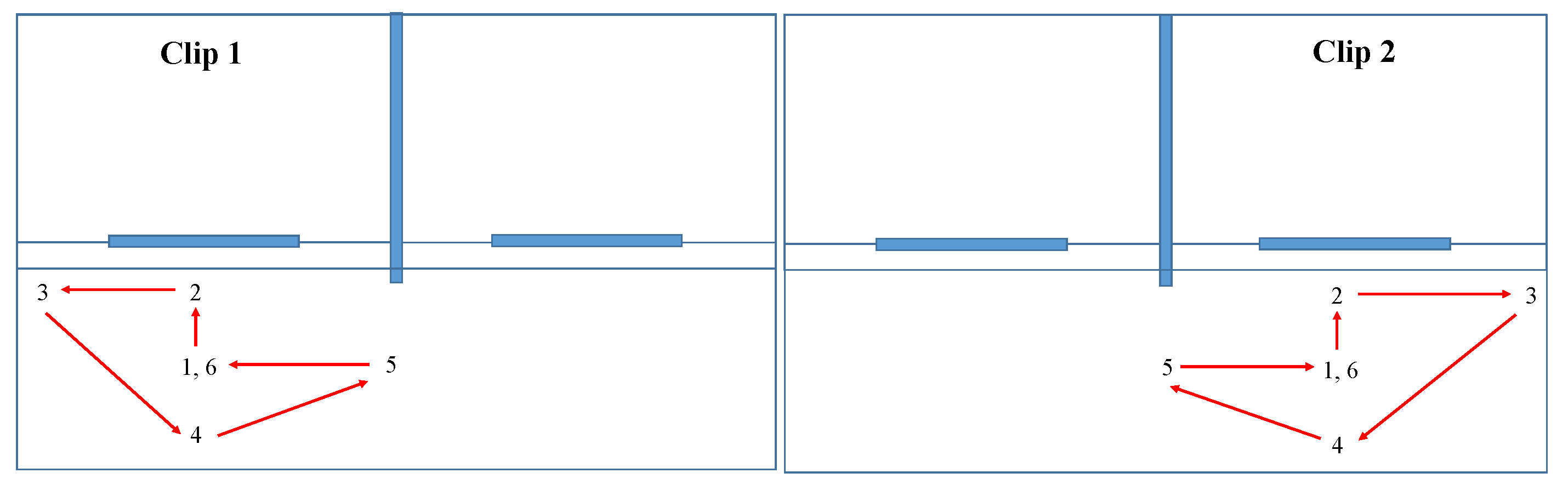
To test the effect of the distance and viewing perspectives, for each of the subtitling presentation modes, smooth camera movements and transitions were programmed and triggered in each test condition, for the two clips. These transitions between positions and implicit viewpoints are sketched and listed in Figure 3.
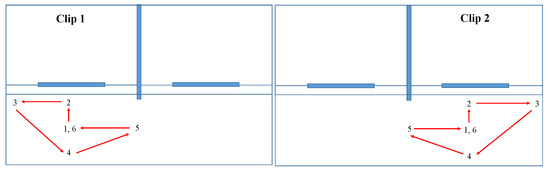
Figure 3.
Forced camera movements in Clips 1 and 2, with smooth transitions: P1(0–30 s): centered position; P2(30–60 s): close to one-way mirror; P3(60–90 s): corner, low visibility; P4(90–120 s): centered position, but distant; P5(120–150 s): side, distant, crosswise (side viewing perspective); P6(150–180 s): centered position.
4.2. Sample of Participants
In total, 24 users participated in the study (of which, half were female). They were aged between 18 and 65 years (average 35.1, standard deviation 14.7); 13 were young adults (18–35 years), nine were middle-aged adults (36–55 years); and two were older adults (>55 years).
Regarding their study level, 20.8% of participants had a secondary school level, 25% were undergraduate university students, 29.1% held a university degree, 20.8% held a PhD degree, and 4.1% preferred not to indicate their study level. All participants were hearing users, but the audio was muted, so the subtitles became a key element to understand the story. A portion of 58.3% of the participants had previous experience with VR content consumption using VR headsets (half less than once per year, 28.5% between 1–5 times per year, 14.2% on a monthly basis, and 7.1% on a weekly basis).
It must be noted that no particular filter was applied for the participants’ recruitment, beyond having a good level of English, because the subtitles were presented in that language. This was because the considered subtitling modes and use of indicators can provide benefits to the general audience, and can potentially be applied in many different scenarios [5].
4.3. Results
This subsection reports on the results for the two parts of the user tests.
4.3.1. Test Condition: Presentation Modes
The impact on presence of each of the considered subtitling presentation modes was assessed using the IPQ questionnaire [29], which is composed of 14 statements/items to be rated on a seven–point scale (1 to 7). In turn, the 14 items are categorized into four sub-scales:
- General Presence: One item that assesses the general “sense of being there”.
- Spatial Presence: Five items that measure the sense of being physically and bodily present in the virtual environment.
- Involvement Scale: Four items that measure the attention that the subject pays to the virtual environment and the involvement experienced.
- Experienced Realism: Four items that measure the subjective experienced sense of realism attributed to the virtual environment
Table 3, Table 4, Table 5 and Table 6 provide a summary of the mean and standard deviation values of the answers of the participants for each of the scales, together with the statistical analysis to determine whether significant differences exist between the results obtained for each presentation mode, using a Wilcoxon Signed Rank test (with 95% confidence interval).
Table 3.
IPQ—General Presence Scale.
Table 4.
IPQ—Spatial Presence Scale.
Table 5.
IPQ—Involvement Scale.
Table 6.
IPQ—Experienced Realism Scale.
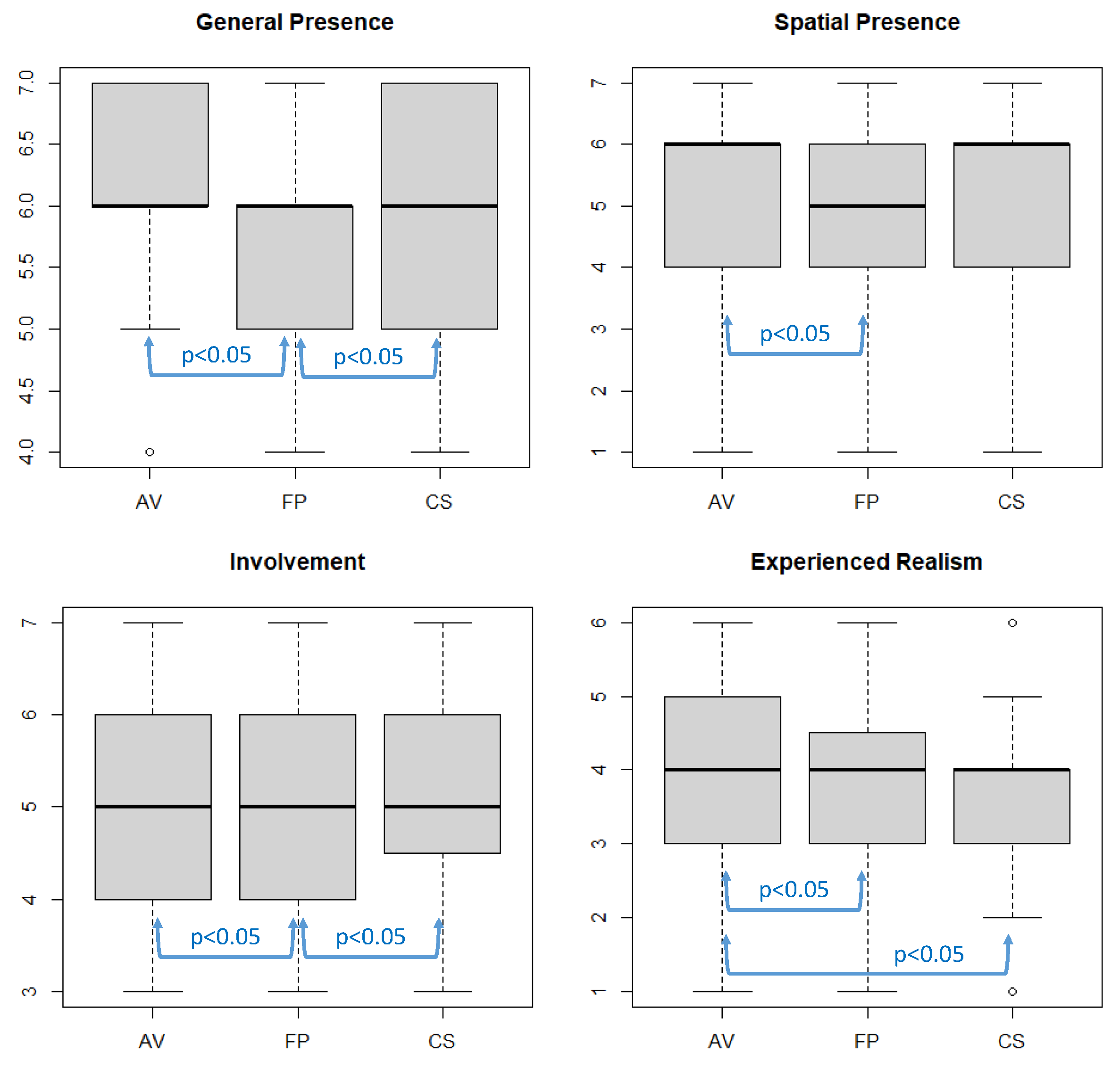
Similarly, Figure 4 shows the boxplots of the obtained results for each presentation mode and IPQ scale, also indicating the situations in which significant differences were found.
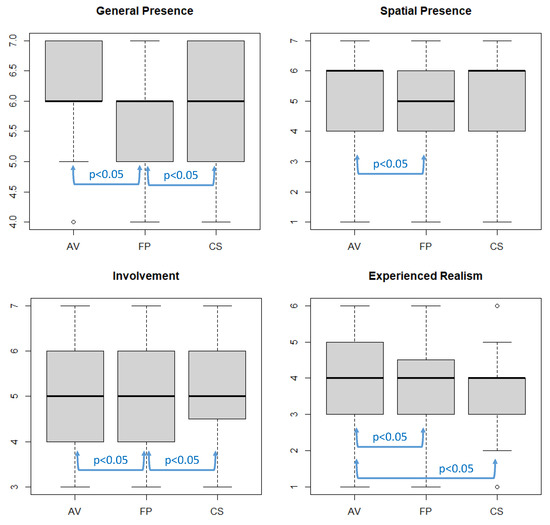
Figure 4.
Boxplots of IPQ scales for each VR subtitling presentation mode (AV = Always-Visible—Mode A; FP = Fixed-Positioned—Mode B; CS = Comic-Style—Mode C).
The results for all three tested conditions were positive, especially for the Always-visible (Mode C) and Comic-style (Mode B) presentation modes. The statistical analysis shows that, in the considered scenario and for the considered implementation, the use of Always-visible subtitles provided higher presence than Fixed-positioned subtitles (Mode A) for each of the IPQ scales. This is also the case for Comic-style (Mode B) subtitles when compared to Fixed-positioned subtitles (Mode A) in terms of the General Presence and Involvement scales. Always-visible subtitles (Mode C) also provided higher presence than Comic-style subtitles (Mode B) with regard to the Experienced Realism scale. This may be due to the fact that the bubbles in which the subtitles were presented resemble comics and animation content, thus having an impact on the experienced realism.
With regard to the results from SSQ, no significant effects/symptoms were found to be caused by the VR experience, in any of the test conditions.
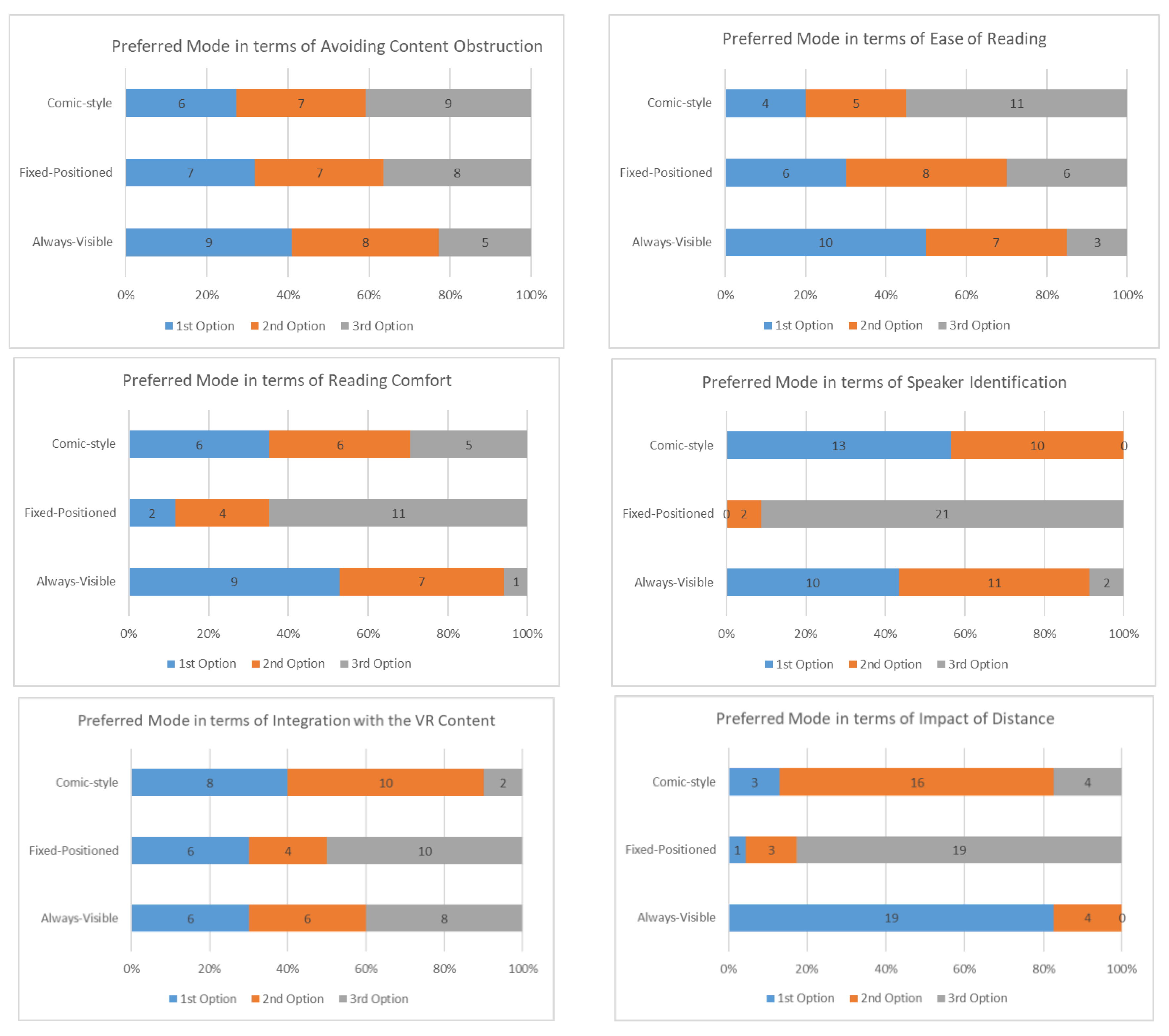
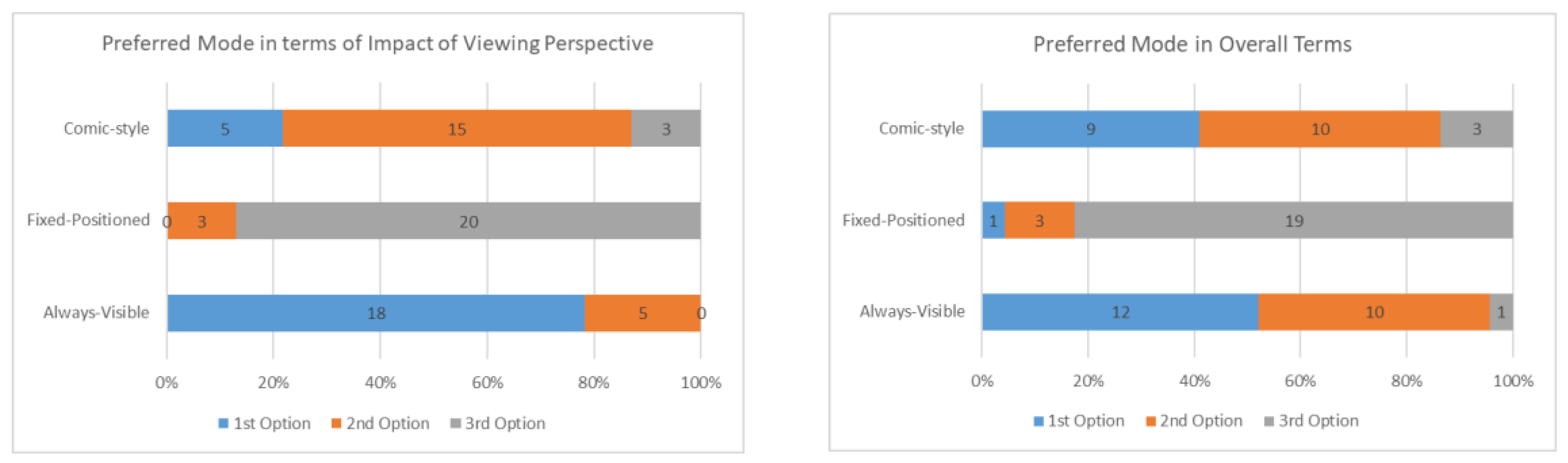
With regard to the results from the ad hoc questionnaire on preferences, the answers are presented in the bar charts in Figure 5. In terms of avoiding content blocking/obstruction, the most preferred mode was Always-visible subtitles, closely followed by the other two options. In terms of ease of reading, Always-visible subtitles were also the most preferred mode, followed by Fixed-Positioned subtitles. The reason why Comic-style was the third preference may be due to the fact that subtitles in such a presentation mode were somewhat small, and thus not easy to read, when the distance between the user and the speaker was large. In terms of reading comfort, Fixed-Positioned subtitles were the third preference. This may be because the users had to change their viewing patters to read the subtitles and see the speakers when using this mode. In terms of speaker’s identification, Comic-style was the most preferred option, because subtitles were associated with the target speaker when using this mode, and Always-visible subtitles were the second preferred option. As expected, Fixed-Positioned subtitles scored worst with regard to this aspect. In terms of integration with the VR content, Comic-style subtitles were again the preferred mode, because subtitles were deliberately integrated with the associated speaker(s). No significant differences were obtained between the other two modes with regard to this aspect.
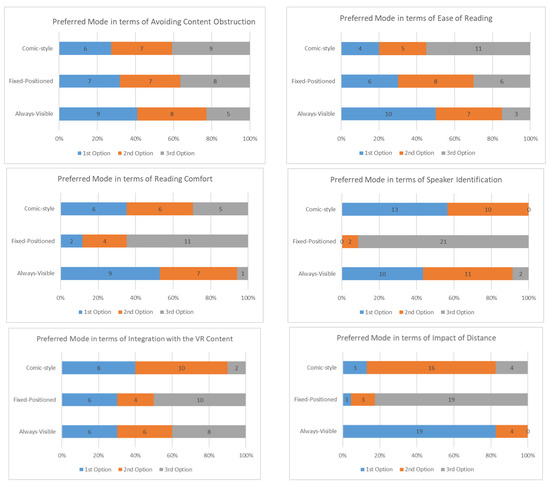
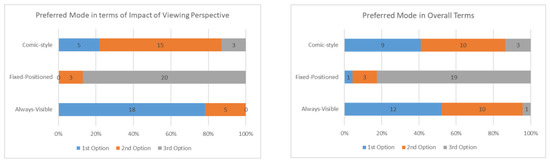
Figure 5.
Preferences for 3D VR subtitling presentation modes.
In terms of the impact of distance and viewing perspective, the Always-visible subtitles mode was clearly preferred, because these two factors had a significant impact on the other two modes. These other two modes may have been adjusted such that the subtitles’ rendering planes were always normal/orthogonal to the user’s viewing perspective, and their size was dynamically adapted according to the distance; however, this needs further investigation and fine-tuning. Finally, in overall terms, Always-visible subtitles was the most preferred mode, closely followed by Comic-style subtitles. This is in line with the results from the IPQ questionnaire, and confirms that the two innovative 3D VR subtitling presentation modes proposed in this study provide benefits in terms of the user experience.
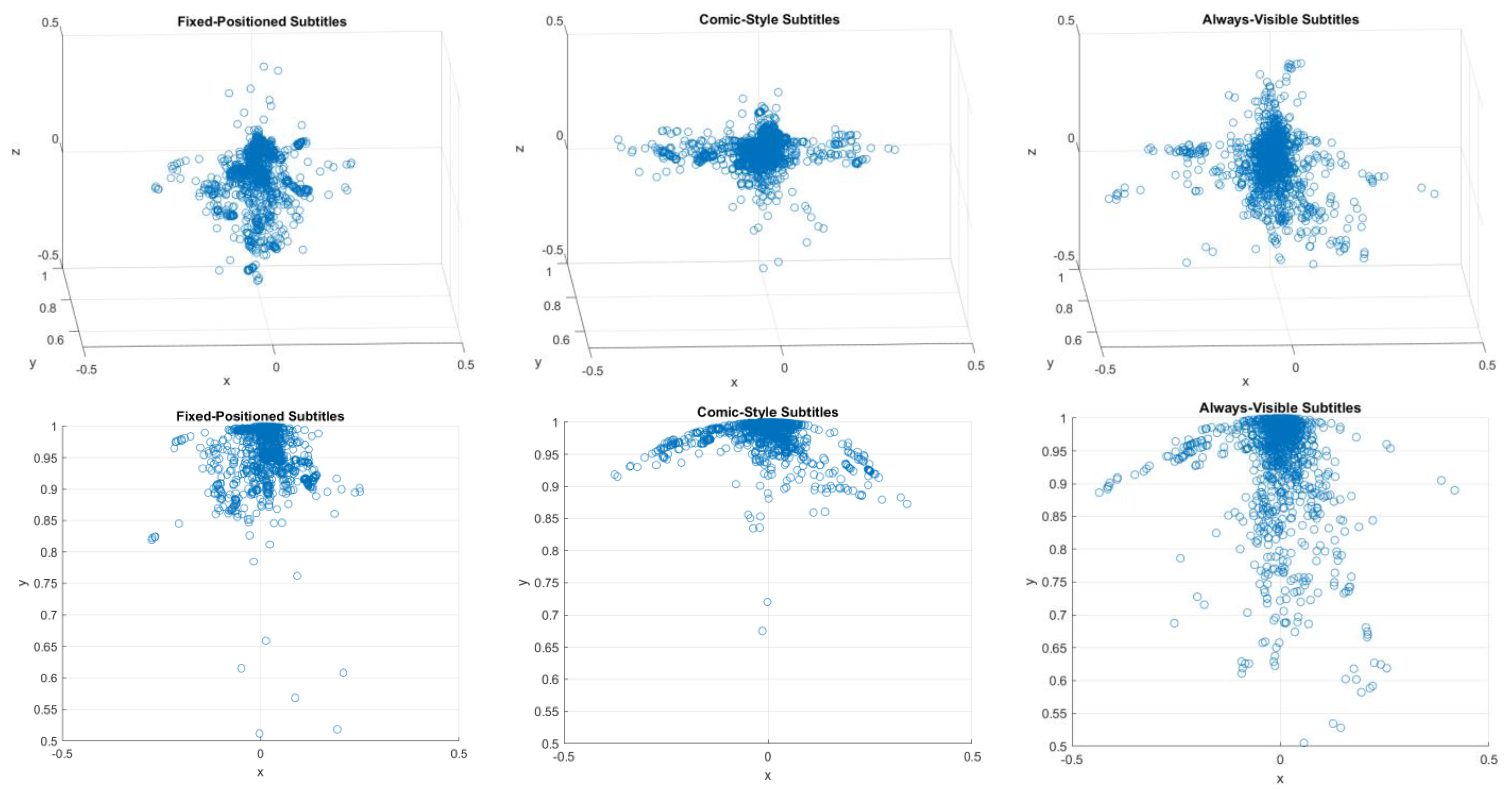
Finally, the user’s position and camera position (i.e., the viewpoints) were recorded each 0.5 s during all test conditions. The goal of this was to compare the users’ viewing patterns for each of the considered subtitling presentation modes to assess whether these modes have any impact on the omnidirectional 3D scene exploration. The obtained results for a sub-sample of eight users (those who watched each presentation mode for Clip 1, Table 1) are shown in Figure 6. These results confirm that, when using the Always-visible mode, the users further explored the omnidirectional 3D environment, because the subtitles were never overlooked. In contrast, free exploration of the 3D environment when using the Fixed-positioned modes, including the Comic-style mode, can cause the subtitles to be positioned outside of the FoV, and thus result in a loss of information (recall that the audio was muted in the tests; in addition, in real-world applications, users may have hearing impairments or not understand the spoken language). As a result, full exploration of the 3D environment was less common when using these two modes. The three upper graphs in Figure 6 provide the heat maps from the 3D front views, whereas the three lower ones from 2D aerial projections of the previous charts.
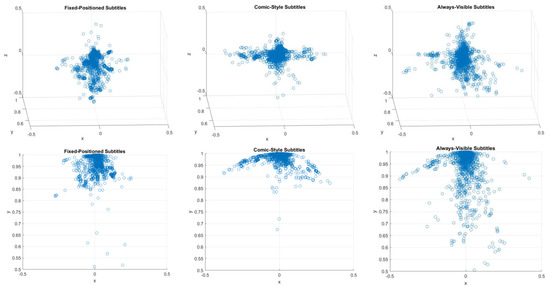
Figure 6.
Heat maps of viewing patterns when using each of the considered 3D VR subtitling presentation modes in Clip 1. The upper graphs are 3D front views for each mode, whereas the lower graphs are 2D aerial projections of the upper charts.
4.3.2. Test Condition: Use of Guiding Methods
In the second part of the tests, participants again watched the two parts of Clip 2 (2A, 2B), in that order, to appropriately understand the story, with the 3D arrow indicator enabled for Modes B and C, in a counterbalanced manner (Table 2). The arrow was positioned at the bottom right of the FoV to ensure the subtitles were not blocked in Mode C. In these test conditions, the forced camera movements were especially useful to demonstrate that the arrow can point at any time at the target speaker, regardless of the user’s position and viewpoint.
Table 7 provides the answers to the ad-hoc questionnaire focused on assessing the benefits of using indicators. The obtained results show that many participants (above 60%) believed that the arrow is beneficial for better positioning within the VR environment and for better identification of the active speaker, both when using Always-visible and Comic-style presentation modes. Participants generally agreed that the use of indicators can contribute to better content comprehension (almost 70%), and that their inclusion does not have a negative impact on immersion (above 80%), but may even have a positive impact (especially if relevant for content comprehension). Participants were also satisfied with the graphic design of the arrow, although it appears it could be improved.
Table 7.
Benefits and appropriateness of guiding methods (3D arrow).
Participants were additionally asked to make suggestions regarding improvements for the (use of) visual guiding methods, of which the following can be highlighted: use of colors associated with subtitles for association with different speakers (12.5%); assessing the use of 3D gaming radars (12.5%); and improvement of the design (8.3%). However, no concrete suggestions were provided to achieve the latter suggestion, beyond enlarging the size slightly (8.3%) and adding intermittence effects to the arrow (8.3%).
4.3.3. Final Questions
Finally, participants were asked general questions about the relevance of subtitling for hearing users, and of VR subtitling in particular (Table 8).
Table 8.
Relevance of (3D VR) Subtitling.
Over 90% of participants believed both that subtitles are beneficial for hearing users and that an appropriate subtitling of VR content is a relevant feature to be explored and provided. Participants were also asked about the situations that could benefit from the use of subtitles, in their opinion, and the following answers were obtained: when consumers do not speak the content language (33.3%); for language learning and improvement (25%); in noisy environments (20.8%) or if/when the audio volume is low (16.7%); to train reading skills (16.7%); to understand/obtain the spelling of specific uncommon words and names (12.5%); and when the audio quality is not good (8.3%).
Finally, participants were encouraged to make final free comments, of which, key comments were: subtitles helped them to understand the story (25%), in fast action scenes it was difficult to read subtitles (16.7%), and that hybrid modes (e.g., combining Modes B and C) may help to overcome the impact of distance and viewing perspectives, but also to increase the immersion when the speakers are within the current FoV (20.8%).
5. Discussion
This study aimed to provide insights into the accessibility of immersive media, by focusing on 3D VR content subtitling. As a response to the increased relevance of this content format and medium, in conjunction with its lack of accessibility solutions, two key research questions in this topic were explored: the appropriateness of different presentation modes and the potential benefits of using guiding methods.
As with recent studies on VR360 video subtitling [9], the results from the conducted user tests showed that an Always-visible presentation mode is significantly more appropriate than a Fixed-positioned presentation mode for subtitles. The differences are even larger in 3D VR environments than in VR360 video environments, particularly due to two key factors: depth and 6DoF (i.e., freedom to explore). Unlike in VR360 video environments in which subtitles can, for example, be replicated each 120° in the sphere (which is the strategy proposed and adopted by BBC, among others [9,13]), this is clearly not an appropriate and sufficient solution in 3D VR environments, because of potential content blocking and the depth dimension, respectively. The conducted user tests provided relevant insights into these relevant issues. In addition, a novel Comic-style presentation mode was proposed and very well received by users. This mode was shown to provide similar levels of presence as the Always-visible mode, for all scales of the IPQ questionnaire (Table 3, Table 4, Table 5 and Table 6 and Figure 4), with the exception of the Experienced Realism scale. This may be because the addition of comic-like bubbles has an impact on the experienced realism, because the story resembles a comic or animation film.
The Comic-style was, in general, the second most preferred mode by users, but the most preferred mode in terms of relevant aspects, such as speaker identification and integration with the VR content. This reflects the potential of this mode, and the importance of undertaking further research to assess its benefits, and to ideally overcome some of its identified drawbacks (e.g., ease of reading, impact of distance and viewing modes, and content blocking).
It should be also noted that the considered VR scenario creates its own specific conditions that may potentially impact the obtained results. First, all of the actions take place within a delimited area (inside the interrogation rooms), where the speakers do not significantly move. The area is also separated by a mirror from the user’s area, so the users, for example, cannot move around the speakers. In addition, despite forcing camera movements, the scenario does not incite the users to navigate around the 3D VR environment, and therefore the scenario has limited 6DoF. Nonetheless, evaluation of these types of test sequences is valuable, because they are very common in, and applicable to, a wide variety of use cases, such as e-learning, content watching, and sports/cultural events.
Regarding their adoption in VR services, it should be remarked that the suggested presentation modes and visual guiding method are easy to implement, and can take advantage of automation techniques. Always-visible subtitles are the easiest to implement, as they do not depend on the 3D VR scenes to which they refer, but are attached to the virtual camera. However, placeholders for the presentation of subtitles can be strategically added for enabling Fixed-positioned and Comic-style presentation modes. In addition, as mentioned in Section 3, the area for presenting the subtitles has a delimited size, and can be strategically presented to maximize readability and minimize collisions/occlusions.
Although the results from this study may not be generalizable for all types of VR content and scenarios, particularly those using 6DoF and in which actions take place in different places and depths, its findings provide valuable answers to RQ1 (what are the most appropriate subtitling presentation modes for 3D VR content?), and also provided insights for further research on this topic. One example is the exploration of hybrid approaches, in which Always-subtitles subtitles are enabled when the speakers are outside of the FoV, and this mode is switched to Comic-style (or to some form of subtitles attached to the speaker) when the speaker is within the FoV.
In addition, the conducted tests provided valuable feedback about the benefits of using visual guiding methods (RQ2). Although the use of a 3D arrow was well received, the hypothesis is that the results would have been even more positive in scenarios with 6DoF and/or in scenarios in which the speakers and the users can freely and significantly move around the VR environment. In addition, although it was shown in [9] that the use of arrows was preferred to the use of a radar for VR360 video environments, a few users also suggested exploring the use of the radar as a guiding method, particularly in 3D VR environments with 6DoF. Having determined that guiding methods are beneficial and well received, specific tests on comparing these two methods should be conducted in the future in 6DoF scenarios to gain insights into the most appropriate one(s).
In general, the conducted tests not only served to validate the appropriateness, benefits, and positive reception of the adopted solutions and variants to meet the key identified requirements for efficiently subtitling 3D VR content, but also to provide valuable feedback to fine-tune them, and even to identify further research opportunities.
Finally, the tests were conducted with a reasonable number of hearing users, but with no particular recruitment filters, given the wide applicability of both subtitles and VR services, as highlighted in Section 1. A very valuable output for the research community would be the execution of larger-scale tests to gain more conclusive insights into the impact and benefits of the proposed aspects (presentation modes and guiding methods) in/for different content genres, VR scenarios, and audience profiles, including deaf and/or hard-of-hearing users.
6. Conclusions and Future Work
The use of immersive media is increasing, and needs to be accompanied with appropriate accessibility solutions. This study explored, for the first time, two key requirements for subtitling 3D VR content: presentation modes and the use of guiding methods. The conducted tests showed that Always-visible subtitles are significantly more preferred to classic Fixed-Positioned subtitles. This finding is consistent with the results of recent studies focused on VR360 video [9]. Interestingly, the results showed that the newly proposed Comic-style presentation mode was, in general, very well received, and was the most preferred option in terms of relevant aspects (e.g., integration with the VR content and identification of speakers). This reveals its potential, especially for specific content genres (e.g., gaming and animation) and audience profiles (e.g., young consumers). In addition, the results also proved that the use of guiding methods in 3D VR content, in particular of a 3D arrow as the visual indicator, is beneficial and welcomed by users. This is also in line with the results of previous research works on VR360 video [9].
In general, the obtained results have not only provided insights into the appropriateness and benefits of the proposed and adopted solutions, but also provided valuable feedback for refining them and identifying opportunities/needs for future research. Given the lessons learned and remaining open questions, future work will be targeted at:
- Exploring the adoption and benefits of hybrid and advanced presentation modes and strategies, based on the dynamic user’s and speaker’s positions and viewpoints, and on the presented VR scenes.
- Exploring the adoption and benefits of Easy-to-Read subtitles [30] in 3D VR scenes and environments, due to identified difficulties in following the subtitles for specific (fast and high-motion) scenes.
- Exploring the adoption and benefits of all proposed solutions, including 3D radars as guiding methods, in 3D VR scenarios with 6DoF—or with significantly less limited 6DoF—such as gaming and those presented and envisioned in [31].
These future works will also take into account the valuable feedback for refining the proposed implementations. In essence, this work not only provides innovative solutions and valuable insights and recommendations for the community, but additionally paves the way for further research on this topic by identifying further relevant opportunities.
Supplementary Materials
Demo video showcasing the proposed and adopted subtitling solutions, as well as some implications of their usage: https://www.youtube.com/watch?v=SzastPjzzeM (accessed on 12 August 2021).
Author Contributions
All authors have contributed substantially to the presented study. M.M. and S.F. were involved in all phases, from the problem identification and conceptualization to the validation, analysis and documentation. C.H. and J.A.D.R. were especially involved in the implementation and evaluation phases. All authors have read and agreed to the published version of the manuscript.
Funding
This work was partially funded by the EU’s Horizon 2020 program, under agreement nº 762111 (VR-Together project). Work by Mario Montagud was additionally funded by the Spanish Ministry of Science, Innovation and Universities with a Juan de la Cierva—Incorporación grant (Ref. IJCI-2017-34611) and with the ALMA Excellence Network (Ref. RED2018-102475-T), and by the Fundación BBVA with a Leonardo Grant entitled “Accesibilidad en Medios Inmersivos”.
Institutional Review Board Statement
The study was conducted according to the guidelines of the EU General Data Protection Regulation (GDPR) Declaration of Helsinki, and approved by the Data Protection Officer of i2CAT (https://i2cat.net/privacy-policy/ accessed on 12 August 2021), prior conducting the tests.
Informed Consent Statement
Informed consent was obtained from all subjects involved in the study.
Data Availability Statement
Data is contained within the article.
Conflicts of Interest
The authors declare no conflict of interest.
References
- Montagud, M.; Orero, P.; Matamala, A. Culture 4 all: Accessibility-enabled cultural experiences through immersive VR360 content. Pers. Ubiquitous Comput. 2020, 24, 887–905. [Google Scholar] [CrossRef]
- Matamala, A.; Orero, P. Listening to Subtitles: Subtitling for the Deaf and Hard-of-Hearing; Peter Lang: Berna, Switzerland, 2010. [Google Scholar]
- Romero-Fresco, P. Subtitling for the Deaf and Hard of Hearing. In Routledge Encyclopedia of Translation Studies; Baker, M., Saldanha, G., Eds.; Routledge: London, UK, 2020; pp. 549–554. [Google Scholar]
- Kapsaskis, D. Subtitling Iterlingual. In Routledge Encyclopedia of Translation Studies; Baker, M., Saldanha, G., Eds.; Routledge: London, UK, 2020; pp. 554–560. [Google Scholar]
- Montagud, M.; Boronat, F.; Marfil, D.; Pastor, F.J. Web-based platform for a customizable and synchronized presentation of subtitles in single- and multi-screen scenarios. Multimed. Tools Appl. 2020, 79, 21889–21923. [Google Scholar] [CrossRef]
- Rodriguez, A.; Talavera, G.; Orero, P.; Carrabina, J. Subtitle Synchronization across Multiple Screens and Devices. Sensors 2012, 12, 8710–8731. [Google Scholar] [CrossRef] [PubMed]
- Orero, P.; Martín, C.A.; Zorrilla, M. HBB4ALL: Deployment of HbbTV Services for All. In Proceedings of the IEEE International Symposium on Broadband Multimedia Systems and Broadcasting, Ghent, Belgium, 17–19 June 2015. [Google Scholar]
- Hu, Y.; Kautz, J.; Yu, Y.; Wang, W. Speaker-Following Video Subtitles. ACM Trans. Multimedia Comput. Commun. Appl. 2015, 11, 1–17. [Google Scholar] [CrossRef] [Green Version]
- Montagud, M.; Soler, O.; Fraile, I.; Fernández, S. VR360 Subtitling: Requirements, Technology and User Experience. IEEE Access 2020, 9, 2819–2838. [Google Scholar]
- Li, J.; Vinayagamoorthy, V.; Williamson, J.; Shamma, D.A.; Cesar, P. Social VR: A New Medium for Remote Communication and Collaboration. In Extended Abstracts of the 2021 CHI Conference on Human Factors in Computing Systems; Association for Computing Machinery: New York, NY, USA, 2021; pp. 1–6. [Google Scholar]
- Radianti, J.; Majchrzak, T.A.; Fromm, J.; Wohlgenannt, I. A systematic review of immersive virtual reality applications for higher education: Design elements, lessons learned, and research agenda. Comput. Educ. 2020, 147, 103778. [Google Scholar] [CrossRef]
- Xue, T.; Li, J.; Chen, G.; Cesar, P. A Social VR Clinic for Knee Arthritis Patients with Haptics. In Proceedings of the ACM International Conference on Interactive Media Experience 2020, Barcelona, Spain, 17 June 2020. [Google Scholar]
- Hughes, C.; Montagud, M. Accessibility in 360° video players. Multimed. Tools Appl. 2020. [Google Scholar] [CrossRef]
- Bartoll, E.; Martínez-Tejerina, A. The Positioning of Subtitles for the Deaf and Hard of Hearing. In Listening to Subtitles: Subtitles for the Deaf and Hard-Of-Hearing; Peter Lang: Frankfurt, Germany, 2010; pp. 69–86. [Google Scholar]
- Civera, C.; Orero, P. Introducing Icons in Subtitles for Deaf and Hard of Hearing: Optimising Reception? In Listening to Subtitles: Subtitles for the Deaf and Hard-Of-Hearing; Peter Lang: Frankfurt, Germany, 2010; pp. 149–162. [Google Scholar]
- Szarkowska, A.; Gerber-Morón, O. Viewers can keep up with fast subtitles: Evidence from eye movements. PLoS ONE 2018, 13, e0199331. [Google Scholar] [CrossRef] [PubMed]
- Eardley-Weaver, S. Opera (Sur)Titles for the Deaf and Hard-of-Hearing. In Audiovisual Translation. Taking Stock; Díaz-Cintas, J., Neves, J., Eds.; Cambridge Scholars Publishing: Newcastle, UK, 2015; pp. 261–276. [Google Scholar]
- Brown, A.; Turner, J.; Patterson, J.; Schmitz, A.; Armstrong, M.; Glancy, M. Exploring Subtitle Behaviour for 360° Video; White Paper WHP 330; BBC Research & Development: London, UK, 2018. [Google Scholar]
- Rothe, S.; Kim, T.; Hussmann, H. Dynamic Subtitles in Cinematic Virtual Reality. In Proceedings of the 2018 ACM International Conference on Interactive Experiences for TV and Online Video, Seoul, Korea, 26–28 June 2018. [Google Scholar]
- Agulló, B.; Matamala, A. (Sub)titles in cinematic virtual reality: A descriptive study. Onomázein 2021, 53. Unpublished. [Google Scholar]
- Agulló, B.; Orero, P. 3D Movie Subtitling: Searching for the best viewing experience. CoMe-Studi Comun. Mediazione Linguist. Cult. 2017, 2, 91–101. [Google Scholar]
- González-Zúñiga, D.; Carrabina, J.; Orero, P. Evaluation of Depth Cues in 3D Subtitling. Online J. Art Des. 2013, 1, 16–29. [Google Scholar]
- Mangiron, C. Reception of game subtitles: An empirical study. Translator 2016, 22, 72–93. [Google Scholar] [CrossRef]
- Brown, A.; Jones, R.; Crabb, M.; Sandford, J.; Brooks, M.; Armstrong, M.; Jay, C. Dynamic Subtitles: The User Experience. In Proceedings of the ACM International Conference on Interactive Experiences for TV and Online Video, Brussels, Belgium, 3–5 June 2015; pp. 103–112. [Google Scholar]
- Hughes, C.; Montagud Climent, M.; tho Pesch, P. Disruptive Approaches for Subtitling in Immersive Environments. In Proceedings of the ACM International Conference on Interactive Experiences for TV and Online Video, Manchester, UK, 5–7 June 2019; pp. 216–229. [Google Scholar]
- Asociación Española de Normalización y Certificación. Norma UNE 153010: Subtitulado Para Personas Sordas y Personas con Discapacidad Auditiva. Subtitulado a Través del Teletexto. 2003. Available online: https://www.une.org/ (accessed on 12 August 2021).
- Debarba, H.G.; Montagud, M.; Chagué, S.; Lajara, J.; Lacosta, I.; Langa, S.F.; Charbonnier, C. Content Format and Quality of Experience in Virtual Reality. arXiv 2020, arXiv:2008.04511. [Google Scholar]
- Kennedy, R.S.; Lane, N.E.; Berbaum, K.; Lilienthal, M.G. Simulator Sickness Questionnaire: An Enhanced Method for Quantifying Simulator Sickness. Int. J. Aviat. Psychol. 1993, 3, 203–220. [Google Scholar] [CrossRef]
- Igroup Presence Questionnaire (IPQ). Available online: http://www.igroup.org/pq/ipq/index.php (accessed on 12 August 2021).
- Oncins Noguer, E.; Bernabé, R.; Montagud, M.; Arnáiz Uzquiza, V. Accessible scenic arts and Virtual Reality: A pilot study in user preferences when reading subtitles in immersive environments. MonTI 2020, 12, 214–241. [Google Scholar] [CrossRef]
- Montagud, M.; Segura-Garcia, J.; De Rus, J.A.; Jordán, R.F. Towards an Immersive and Accessible Virtual Reconstruction of Theaters from from the Early Modern. In Proceedings of the ACM International Conference on Interactive Media Experience 2020, Barcelona, Spain, 17 June 2020; pp. 143–147. [Google Scholar]

Publisher’s Note: MDPI stays neutral with regard to jurisdictional claims in published maps and institutional affiliations. |
© 2021 by the authors. Licensee MDPI, Basel, Switzerland. This article is an open access article distributed under the terms and conditions of the Creative Commons Attribution (CC BY) license (https://creativecommons.org/licenses/by/4.0/).